Quantcast
Channel: MongoDB Archives - Percona

Expanding Our Reach: Percona Server for MongoDB Now Officially Supports Rocky Linux 8 and 9!

$
0
0

Your stack, Your rules. That’s our belief, and it’s non-negotiable. 

We see the landscape changing. With the massive community migration from CentOS and CentOS Stream to Rocky Linux, we heard your requests loud and clear. You need a trusted, enterprise-ready database on your preferred platform. Our telemetry data, which we receive from you, also confirms it – Rocky Linux OS is now the most popular choice among the 118 OSes we see in the landscape.

Percona Server for MongoDB Operating Systems Breakdown

So we’re not just watching; we’re acting. We are pleased to announce that Percona Server for MongoDB (PSMDB) is officially landing on Rocky Linux 8 and 9!

Let’s be clear: this is no longer a simple verification and a “it should work” rubber stamp. This is a full-blown commitment. Our engineers have integrated Rocky Linux deep into our comprehensive build, testing, and CI/CD pipelines. This ensures that Percona Software for MongoDB performs flawlessly and consistently on Rocky, backed by the reliability and trust you expect from Percona.

What This Means For You

This new capability directly unblocks users who have standardized on Rocky Linux for its stability and open source foundation. We’re already hearing positive feedback from leaders in the field:

“Our technology strategy is built on high-performance, open source solutions that give us the freedom to innovate. We standardized on Rocky Linux for its stability and long-term value. Percona’s official support for Percona Server for MongoDB on Rocky isn’t just a technical update – it’s a critical enabler. It gives us the enterprise-grade confidence to deploy our most demanding, data-intensive applications on our preferred platform. This demonstrates Percona’s clear commitment to the open source community and the needs of its enterprise users.”

— Senior Data & Technology Leader | Cloud Modernisation | AI & Open Source Advocate, ig.com

Have I already written ‘Your Stack, Your Rules’? So, what does this really mean?

  • True Confidence: Deploy on Rocky knowing it’s not just “compatible”—it’s certified. It’s been through the wringer and is now deeply integrated into our build, test, and CI/CD pipelines. We’ve got your back.
  • No More Workarounds: Say goodbye to dependency hacks and “best-effort” installations. You get pure, native performance. Grab our official packages from the Percona repo using standard yum commands. No fuss, no friction.
  • Long-term Commitment: The Linux landscape will continue to evolve. That’s its nature. Our commitment is to give you the stable, high-performance, and independent software that meets your needs without compromise.


How to get started?

Our official repository already includes tarballs and packages for Rocky Linux 8 and 9, which have been tested with MongoDB versions 7.0.26-14 and 8.0.16-5. They are the same downloads as for RHEL, Oracle Linux, and CentOS. Now, are you ready to experience fully supported Percona Server for MongoDB on Rocky Linux?

Grab Percona Server for MongoDB binaries and run it in 5 minutes
or
check the steps from our Documentation to find detailed installation instructions and supported versions.

This is more than just a new platform. It’s a testament to our commitment to an open, adaptable, and user-first approach. We can’t wait to hear from you and your success stories with it. Let us know in our Community forum.

The post Expanding Our Reach: Percona Server for MongoDB Now Officially Supports Rocky Linux 8 and 9! appeared first on Percona.


Introducing Percona Load Generator for MongoDB Clusters: The Benchmark Tool That Simulates Your Actual Application

$
0
0

If you have ever tuned a MongoDB cluster that passed every synthetic benchmark with flying colors, only to choke the moment real user traffic hit, you are not alone.

For years, database administrators and developers have relied on a standard suite of tools to test MongoDB performance (YCSB, Sysbench, POCDriver and mgodatagen –  just to name a few). While effective for measuring raw hardware throughput, these tools often fail to answer the most critical question: “How will this database handle my specific application load?”

In this post, we’ll compare the mentioned standard suites against a new challenger, Percona Load Generator For MongoDB Clusters (PLGM), to see which tool offers the most value for modern engineering teams.

The “Old Guard”: Synthetic Benchmarking Tools

These tools are excellent for comparing one server instance against another (e.g., “Is AWS m5.large faster than Azure D4s?”), but they often fall short on realism.

Tool Primary Purpose Strengths Limitations Best Used When
YCSB NoSQL benchmarking Industry standard; widely adopted; ideal for vendor and hardware comparisons Highly synthetic data; no realistic document structures or index selectivity; primary-key CRUD only Comparing raw performance across vendors or hardware
Sysbench System stress testing Excellent at exposing CPU and disk I/O limits Steep learning curve; Lua scripting required; limited use of MongoDB’s document model Finding infrastructure bottlenecks
POCDriver Basic workload generation Simple CLI; quick to start generating load Limited configurability; poor support for multi-stage application workflows Generating background load or quick demos
mgodatagen Data seeding Maintains relational integrity; supports derived fields, sharding, and index creation Static dataset only; no workload simulation Creating realistic initial datasets before testing

The Challenger: plgm

Enter plgm. Unlike the tools above, which focus on server performance or static data generation, plgm focuses on realism. It was built on the premise that a benchmark is useless if the data and the behavior don’t look like your application. Instead of blasting random keys at the database, plgm allows you to define custom schemas and query patterns that strictly mirror your actual application.

The plgm Advantage

1. Real Data, Not Random Junk

plgm integrates with gofakeit to generate realistic data as opposed to filling your database with random strings.

  • Need a user profile with a nested array of 3 distinct addresses?
  • Need valid email addresses, UUIDs, or realistic dates?

plgm handles this natively. This means your indexes and compression ratios will behave exactly as they do in production. You can literally provide the exact collection definitions and query patterns your application uses, and plgm will execute that precise workload.

2. Native Aggregation Support

Most benchmarks only test simple “Find by ID” queries. But real MongoDB apps run heavy aggregation pipelines among other queries. plgm allows you to define from the most simple query to the most complex pipelines (with $match, $group, $lookup, etc.) in a simple JSON format. You can finally stress-test that analytical dashboard query before it takes down your production cluster.

3. “Configuration as Code” for Workloads

Instead of learning Lua (Sysbench) or complex Java classes (YCSB), plgm uses simple JSON files to define your workload.

  • Collections.json: Define your document structure.
  • Queries.json: Define your mix of Finds, Updates, Deletes and Aggregates.

You can look at your application logs, copy the slow queries into queries.json, and instantly reproduce that exact load in your staging environment. Simply replace the specific values with type placeholders (<int> , <string>, etc …), and plgm will work its magic—automatically generating randomized, type-safe values for every execution.

4. High-Performance Go Architecture

Written purely in Go, plgm utilizes Goroutines to spawn thousands of concurrent workers with minimal memory usage. It automatically detects your CPU cores to maximize throughput, ensuring the bottleneck is the database, not the benchmark tool.

Zero-Dependency Installation & DevOps Ready

One of the biggest pain points with legacy benchmarking tools is the setup. YCSB requires a Java Runtime Environment (JRE) and complex Maven setups. Python-based tools require virtual environments and often struggle with driver version conflicts.

plgm is different.

Because it is written in Go, it compiles down to a single, static binary. There are no dependencies to install. You don’t need Python, Java, or Ruby on your machine.

Step 1: Download

You simply download the appropriate binary for your operating system and run it. Navigate to Releases section of our repository , select the version that best fits your use case, then extract, configure, and run the application.

# 1. Extract the binary
tar -xzvf plgm-linux-amd64.tar.gz

Step 2: Configure

Instead of long command-line arguments, plgm uses a clean and very easy to configure config.yaml file (environment variables are also supported).

Set your Connection 

Open config.yaml and set your MongoDB URI

uri: "mongodb://localhost:27017"

Define Your Reality (Optional) 

If you want to simulate your specific application, simply edit the configuration and point to your own JSON definitions

collections_path: "./my_app_schema.json"
queries_path: "./my_app_queries.json"

Fine tune your workload (Optional) 

Additional optimization and configuration can be performed through config.yaml. The tool also supports environment variables, enabling quick configuration changes between workload runs. This allows you to version-control your benchmark configuration alongside your application code, ensuring your performance tests always match your current schema. Some of the available options include:

  • Configuring default workloads
  • Defining multiple workloads
  • Providing your custom collection definitions and query patterns
  • Concurrency control
  • Workload duration 
  • Optional seeding collections with data
  • Control over operation types and their distribution
    • You can specify the percentage of each operation type, for example:
      • find_percent: 55
      • update_percent: 20
      • delete_percent: 10
      • insert_percent: 10
      • aggregate_percent: 5

  • More …..

Additional capabilities are available and you can find our full documentation in our git repo, Percona Load Generator For MongoDB Clusters (PLGM), with more features currently in development.

Step 3: Using PLGM

Once you have configured plgm to your requirements you can run it and observe the output. 

Native Docker & Kubernetes Support

Modern infrastructure lives in containers, and so can plgm. We provide a Docker workflow and sample Kubernetes Job manifests, so instead of running a benchmark from your laptop, you can deploy plgm as a pod inside your Kubernetes cluster. This eliminates network bottlenecks and tests the database’s true throughput limits.

Head-to-Head Comparison

Feature YCSB Sysbench POCDriver mgodatagen plgm
Primary Use Case Hardware comparison CPU/Disk Stress Quick Load Gen Smart Data Seeding App Simulation
Data Realism Low (Random strings) Low Medium High (Relational) High (Custom BSON)
Complex Queries No (PK only) Difficult (Lua) Limited No (Inserts only) Native Support (Agg)
Configuration Command Line Lua Scripts Command Line JSON JSON / YAML
Workload Logic None Scriptable None None Custom Templates

Verdict: Which Tool Should You Choose?

If Your Goal Is… Choose This Tool Why
Compare vendors or hardware YCSB Standardized, widely recognized benchmark
Stress-test CPU or storage Sysbench Pushes infrastructure to its limits
Generate quick background load POCDriver Minimal setup and fast execution
Seed a realistic dataset mgodatagen Preserves relationships and schema integrity
Benchmark real application behavior plgm Mirrors production traffic, schema, and query patterns

If you care about how your application code truly interacts with the database and queries perform reliably under pressure—synthetic benchmarks are not enough. You need a workload simulator that reflects production reality.

Get started today with plgm and test your database the way your application actually uses it.

The post Introducing Percona Load Generator for MongoDB Clusters: The Benchmark Tool That Simulates Your Actual Application appeared first on Percona.

Memory Management in MongoDB 8.0: Testing the New TCMalloc

$
0
0

With MongoDB 8.0, the database engine takes another step forward in performance optimization, particularly in how it manages memory. One of the most impactful changes under the hood is the updated version of TCMalloc (Thread-Caching Malloc), which affects how the server allocates, caches, and reuses memory blocks.

For workloads with high concurrency, long-running queries, or mixed read/write patterns, the new TCMalloc can deliver noticeable performance gains.

This article explains what TCMalloc is, how it influences performance and memory fragmentation, and what differences you can expect before and after upgrading to MongoDB 8.0.

What is TCMalloc?

TCMalloc (Thread-Caching Malloc) is a memory allocator originally developed by Google. It replaces the standard malloc() and free() calls used by applications written in C/C++ with a faster, multithread-optimized alternative.

In simple terms, TCMalloc handles memory requests more efficiently by caching allocations per thread or per-CPU (default), avoiding the contention that can happen when multiple threads try to allocate or free memory at the same time.

TCMalloc may operate in one of two fashions:

  • (default) per-CPU caching, where TCMalloc maintains memory caches local to individual logical cores.
  • per-thread caching, where TCMalloc maintains memory caches local to each application thread.

In both cases, these cache implementations allow TCMalloc to avoid requiring locks for most memory allocations and deallocations. It ends in low memory fragmentation and reduced system calls that in the majority of cases provides better performance.

TCMalloc in MongoDB 8.0

MongoDB has used TCMalloc as its default allocator, but version 8.0 includes a major upgrade to a newer implementation aligned with upstream Google TCMalloc changes that uses per-CPU caches, instead of per-thread caches.

This brings improved multithreaded scalability, better memory release behavior to the OS, more predictable RSS (Resident Set Size) under heavy workloads.

The upgrade particularly benefits deployments where:

  • Multiple shards or replica set members share the same host (not really recommended if you don’t use containers).
  • Large in-memory datasets (working sets) are frequently changing, and you see increased number of evictions from the WiredTiger cache.
  • Workloads generate many short-lived allocations (e.g., aggregation pipelines, complex queries, or analytical jobs).

Needless to say, because of this under the hood change, MongoDB 8.0 is declared to be faster than previous version 7.0 for a lot of use cases.

The official documentation says that MongoDB 8.0 introduces significant performance improvements from MongoDB 7.0, including, but not limited to:

  • Up to 36% better read throughput.
  • Up to 32% better performance for typical web applications.
  • Up to 20% faster concurrent writes during replication.

Probably the improvement is not only from TCMalloc, but it could be the main contributor.

Important change for Transparent Huge Pages (THP)

If you are a long time user of MongoDB, you probably know that one of the more common best practices for OS tuning was to disable THP. Starting from MongoDB 8.0 the best practice is exactly the opposite: in order to benefit from the new TCMalloc, THP now must be enabled.

The following conditions must be checked to ensure TCMalloc can really use the new per-CPU caches:

  • Kernel version 4.18 or later
  • THP enabled
  • glibc rseq disabled: if another application, such as the glibc library, registers an rseq structure before TCMalloc, TCMalloc can’t use rseq. Without rseq, TCMalloc uses per-thread caches, which are used by the legacy TCMalloc version.

A few details about Rseq (Restartable Sequences). Rseq lets user-space code execute small critical sections that are guaranteed to run atomically on the same CPU, without using locks or syscalls in the fast path. Some operations are extremely common and performance-critical, like: updating per-CPU counters, accessing per-CPU data structures, fast memory allocators and schedulers. In order to benefit of it, TCMalooc must be the one to register an rseq structure.

To verify that TCMalloc is running with per-CPU caches, ensure the following from the serverStatus:

  • tcmalloc.usingPerCpuCaches is true
  • tcmalloc.tcmalloc.cpu_free is greater than 0

Look at the following page for more details:
https://www.mongodb.com/docs/v8.0/administration/tcmalloc-performance/

Testing time

Let’s now do some tests running the same kind of workloads and compare MongoDB 7.0 vs MongoDB 8.0.
The servers used for the tests had the following specifications:

  • 4 CPU
  • 4 GB RAM
  • OS Ubuntu 24.04 LTS

POCDriver was used to generate the workloads. Every test ran for 10 minutes on both servers using 4 parallel threads.

The two versions compared were Percona Server for MongoDB 7.0.26-14 and Percona Server for MongoDB 8.0.16-5.

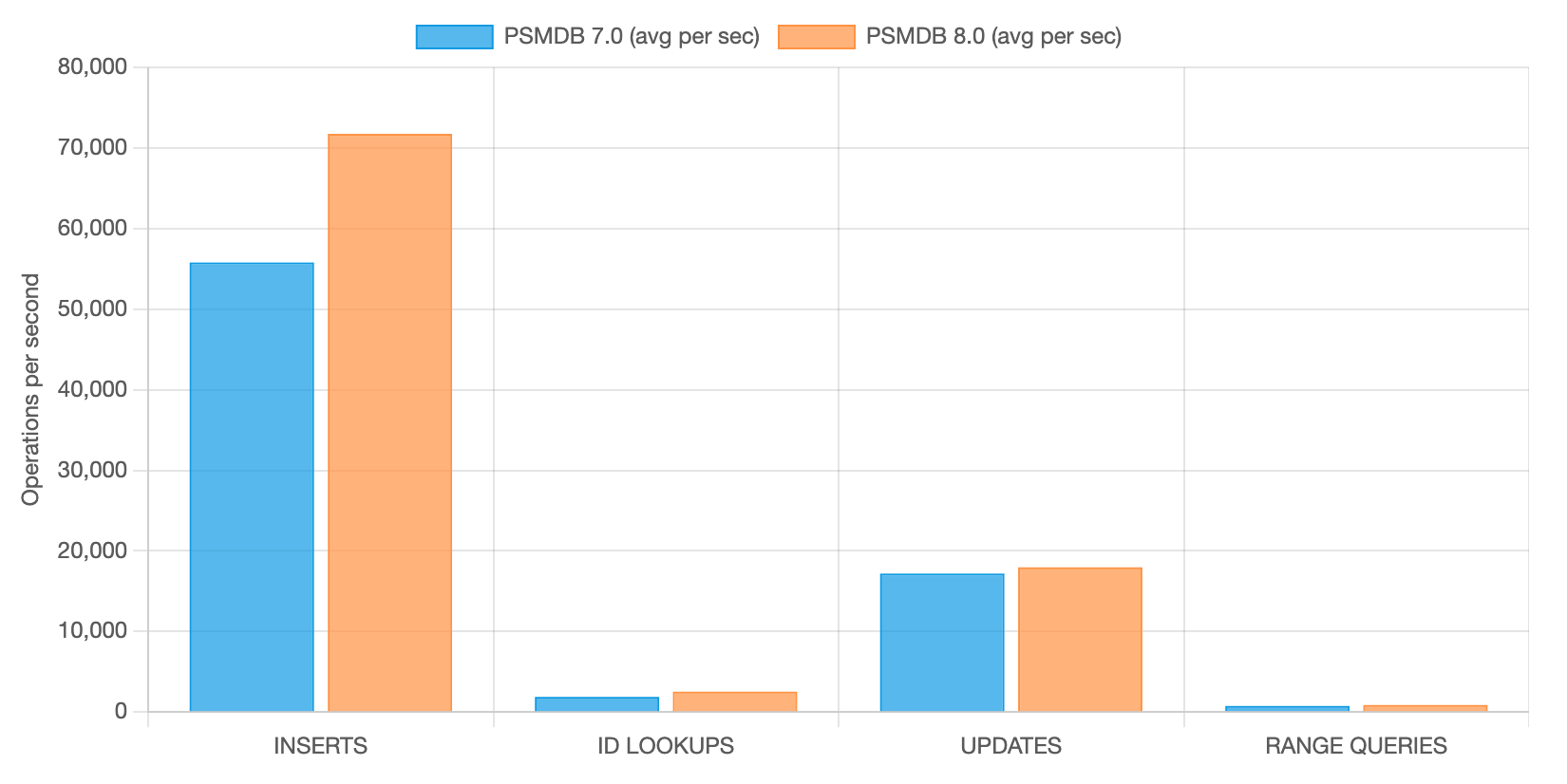
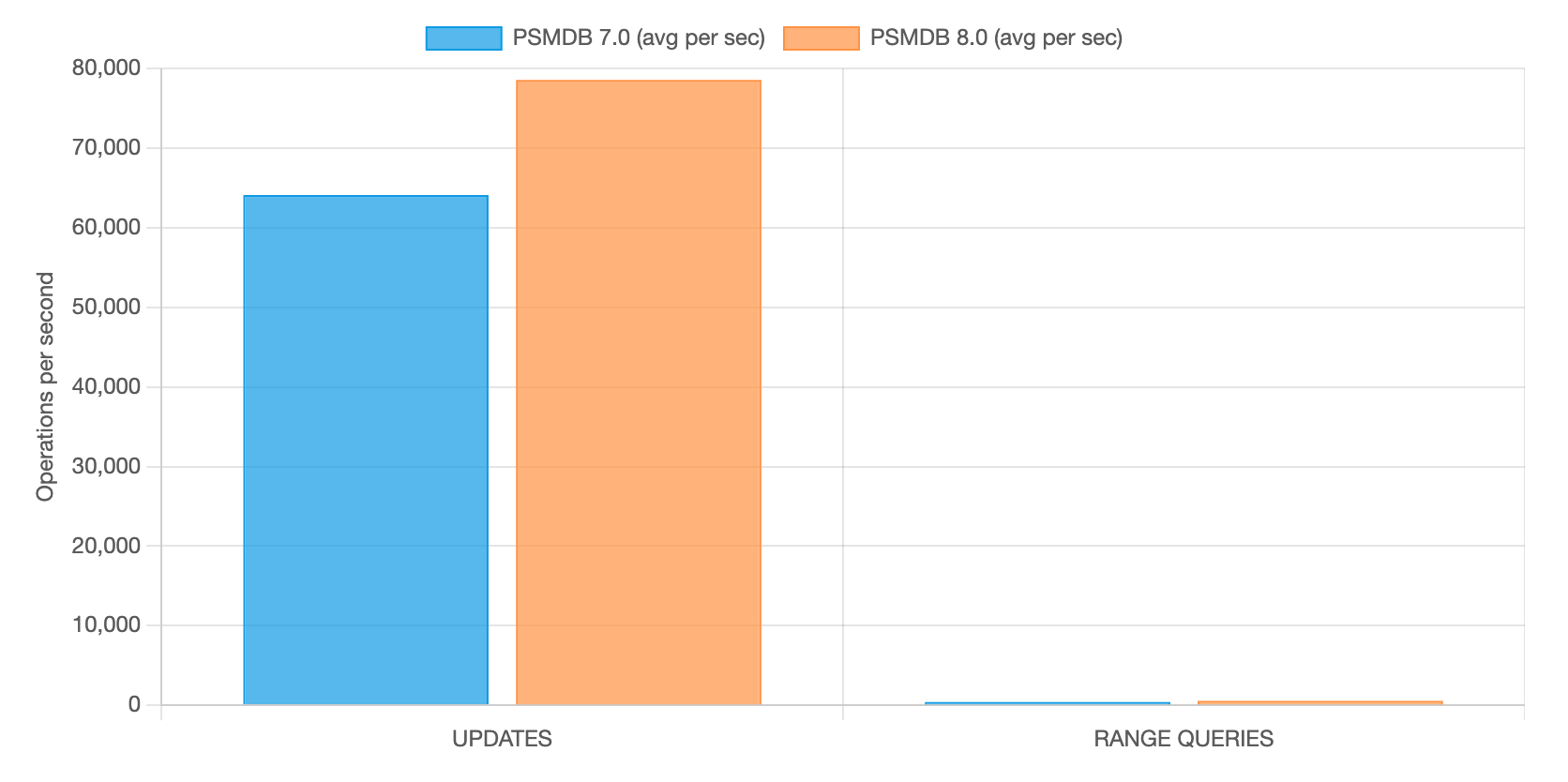
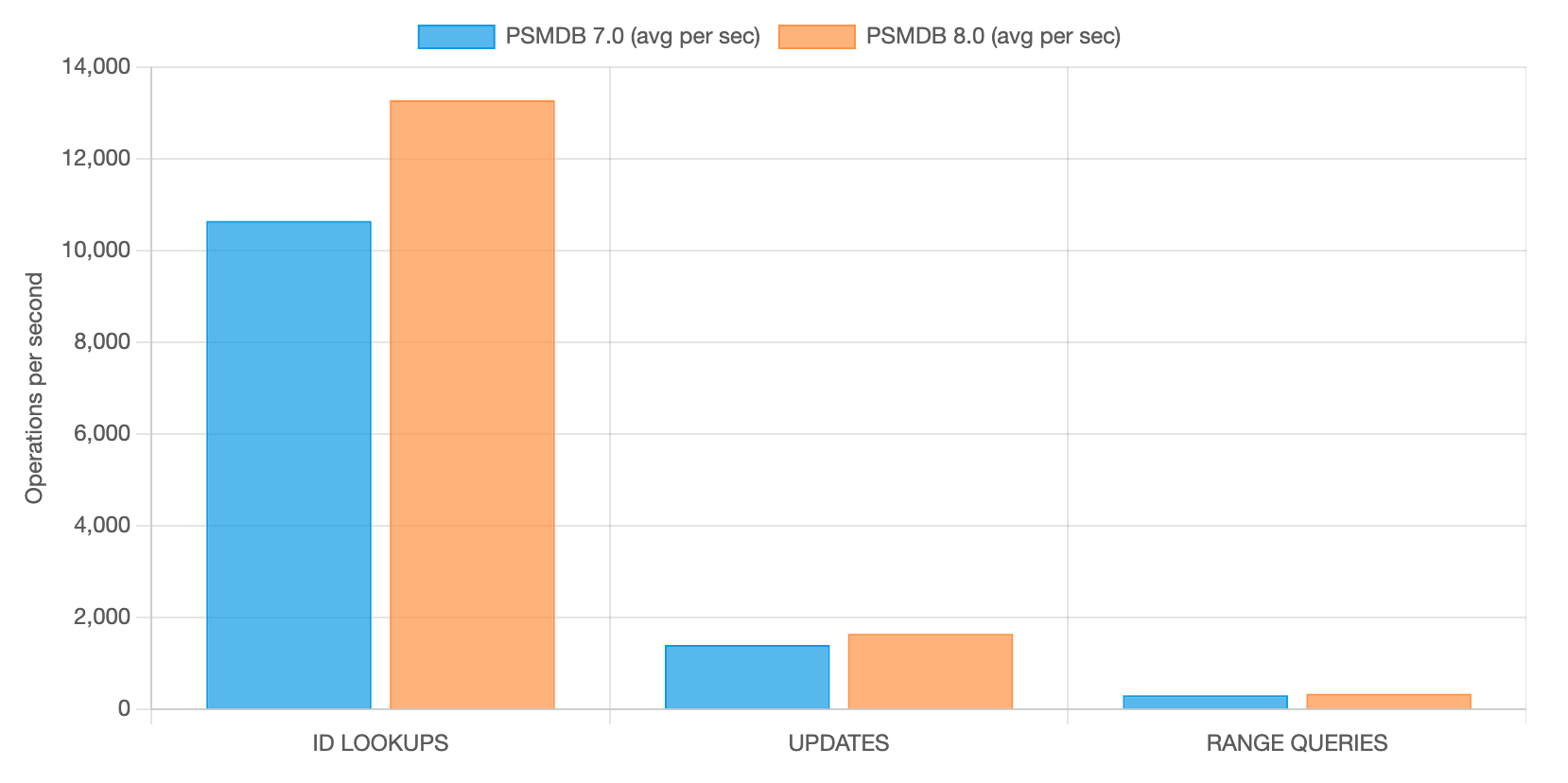
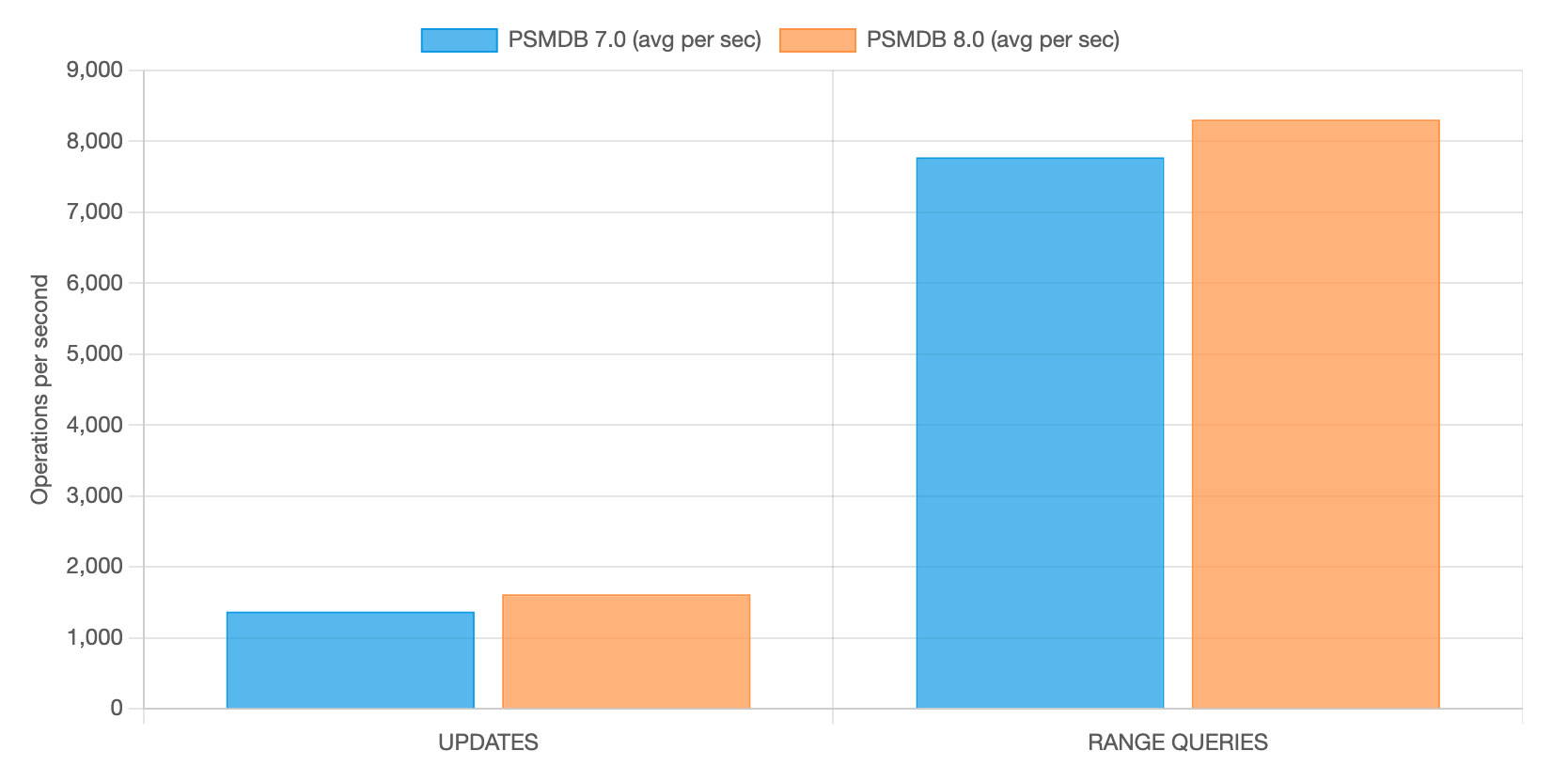
Here are the results of the tests. Higher is better.

INTENSIVE INSERTS AND UPDATES WITH OTHER READS

avg ops per sec

PSMDB 7.0 PSMDB 8.0 % improvement
INSERTS  55,784 71,752 +28.62%
_id LOOKUPS 1.883 2,529 +34.31%
UPDATES  17,178 17,963 +4.57%
RANGE QUERIES  753 874 +16.07%

INTENSIVE UPDATES AND RANGE QUERIES

avg ops per sec

PSMDB 7.0 PSMDB 8.0 % improvement
INSERTS  0 0
_id LOOKUPS 0 0
UPDATES  64,091 78,568 +22.59%
RANGE QUERIES  411 565 +37.47%

INTENSIVE _id LOOKUPS WITH FEW UPDATES AND RANGE QUERIES

avg ops per sec

PSMDB 7.0 PSMDB 8.0 % improvement
INSERTS  0 0
_id LOOKUPS 10.647 13,279 +24.72%
UPDATES  1,408 1,647 +16.97%
RANGE QUERIES  307 339 +10.42%

INTENSIVE RANGE QUERIES AND UPDATES

avg ops per sec

PSMDB 7.0 PSMDB 8.0 % improvement
INSERTS  0 0
_id LOOKUPS 0 0
UPDATES  1,372 1,615 +17.71%
RANGE QUERIES  7,779 8,307 +6.79%

&nbsp;

Conclusions

As promised by the official documentation, MongoDB 8.0 is really faster than MongoDB 7.0. The tests provided results that confirm the benefits declared. Obviously, the real benefits depend on multiple factors, like a customized tuning, a different hardware or other things. You could face a specific scenario that cannot provide the same kind of improvements we had. For this reason, running tests against a new version is always recommended before moving a version to production. Anyway, we are confident the benefits provided by the new TCMalloc with per-CPU caches are really impressive.

The post Memory Management in MongoDB 8.0: Testing the New TCMalloc appeared first on Percona.

Percona Operator for MongoDB in 2025: Making Distributed MongoDB More Predictable on Kubernetes

$
0
0

In 2025, the Percona Operator for MongoDB focused on the hardest parts of running MongoDB in Kubernetes: reliable backups and restores, clearer behavior during elections and restores, better observability at scale, and safer defaults as MongoDB 8.0 became mainstream. The year included real course corrections, such as addressing PBM connection leaks and being explicit about when not to upgrade. The result is an Operator that is more transparent about its guarantees and better suited for multi cluster, multi region, and compliance driven environments.

For many teams, 2025 was not about learning Kubernetes or MongoDB for the first time. It was about running more clusters with fewer people, meeting stricter security and compliance expectations, and expecting routine operations to stay routine.

Community conversations reflected that shift. Questions were less about “how do I deploy” and more about:

  • “How do restores behave under pressure?”
  • “What happens during elections when nodes are drained?”
  • “How do I see what the operator is actually doing across many clusters?”

So let’s see how Percona addressed those and many other requests to deliver best on a market open source kubernetes operator for MongoDB 😉 

Backups and restores became more flexible and less stressful

Early in the year, with version 1.19.0 released in January, the Operator expanded its storage flexibility in two important ways. In addition to adding filesystem based backups over NFS as a tech preview, it also introduced extensibility for PVC resizing to work with external autoscalers. Together, these changes addressed common realities in restricted or highly regulated environments where S3 compatible object storage may not be available and where storage growth needs to be handled dynamically without manual intervention.

That same release also removed a long-standing limitation by allowing backups in unmanaged replica clusters, which simplified disaster recovery designs that rely on secondary or remote clusters.

In May, version 1.20.0 focused heavily on backup workflows. Point-in-time recovery was improved so restores could be performed from any configured storage without waiting for cluster reconfiguration. This reduced friction in environments that rotate or separate storage by purpose.

Incremental physical backups were also introduced around this time as a tech preview. The motivation was straightforward: smaller backups, faster completion, and better recovery time objectives for larger datasets. The boundaries were kept explicit, including the requirement for a base backup and a single storage location for the backup chain.

Across the year, restore behavior was refined based on real-world usage, especially around balancer handling and PBM integration. These changes made restores more predictable, even if they were not always visible as “new features.”

MongoDB 8.0 became easier to adopt with confidence

Support for Percona Server for MongoDB 8.0 arrived at the start of the year and matured steadily over subsequent releases. By October, MongoDB 8.0 became the default version for new clusters, reflecting growing confidence in its stability and readiness.

Along the way, the Operator adapted monitoring roles, backup logic, and restore behavior to match MongoDB 8.x expectations. One notable addition was persistent cluster level MongoDB logging through the logcollector configuration. This made debugging and day two operations significantly easier by ensuring logs survive pod restarts and are accessible at the cluster level rather than being tied to individual containers.

The net result was not just “support for a new version,” but a clearer path to adopting it without rewriting operational playbooks.

Multi-cluster and multi-region operations felt more intentional

As more teams ran MongoDB clusters across namespaces, regions, or even multiple Kubernetes clusters, operational clarity became more important than raw functionality.

Mid-year improvements made it easier to give clusters meaningful names in monitoring, so PMM dashboards stayed readable even in complex environments. This small change reduced confusion during incidents, where identifying the right cluster quickly matters.

Later in the year, concurrent reconciliation was introduced so a single Operator instance could manage multiple clusters more efficiently. Instead of updates queueing behind one another, reconciliation could be tuned to match the scale of the environment.

CRDs also gained clearer version labeling, making it easier to verify that a given CRD definition is consistent with the Operator version running in the cluster. This helped teams avoid subtle mismatches when newer Operator versions introduced updated or expanded CRD schemas, particularly during upgrades and audits.

Replica set behavior got calmer and more predictable

Several improvements throughout the year focused on reducing surprises around elections and topology.

Early on, the Operator added support for manually adjusting replica set member priority, giving teams more control during maintenance or planned failovers.

Later in the year, hidden nodes became available. These nodes hold full copies of data without serving client traffic, making them useful for backups or reporting workloads. 

Together, these changes helped align the Operator more closely with how MongoDB is actually operated in production environments.

Security and access management became simpler

Security-related improvements in 2025 focused on reducing manual work rather than adding complexity.

Automatic password generation for custom MongoDB users allowed teams to declare users directly in the Custom Resource and let the Operator handle secret creation safely.

Support for IAM roles for service accounts reduced the need to manage long-lived credentials for cloud storage access, aligning better with modern cloud security practices.

These changes quietly removed a lot of custom scripting around the Operator.

What we learned as a community

A few themes came up again and again, and most of the work in 2025 followed directly from those lessons.

  • Restore correctness matters more than restore speed
  • Clear boundaries are better than hidden automation
  • Observability needs to scale with the number of clusters, not just the size of one
  • Making tradeoffs explicit builds more trust than pretending they do not exist

What’s next

2025 was about making the Percona Operator for MongoDB feel less surprising and more dependable. Looking ahead, the priorities remain deliberately practical and focused on production realities.

Backup and restore workflows will continue to be hardened, including support for backups using PVC snapshots. This opens the door to faster and more storage native recovery paths, especially in environments where snapshot based workflows are already standard.

Storage automation will advance further with automatic PVC resizing, reducing manual intervention as datasets grow and making it easier to pair the Operator with external autoscalers.

Credential management is another area of active investment. Integrating Vault for system user credential management will help teams standardize secrets handling and align MongoDB operations with broader security and compliance practices.

Restore workflows will also become more flexible with planned support for replica set remapping during restores. This will make it easier to recover into different topologies, regions, or cluster layouts without requiring post restore reconfiguration.

Across all of this, the guiding goal remains the same. Make MongoDB on Kubernetes easier to operate at scale, easier to recover under pressure, and easier to trust when things go wrong.

The post Percona Operator for MongoDB in 2025: Making Distributed MongoDB More Predictable on Kubernetes appeared first on Percona.

Urgent Security Update: Patching "Mongobleed" (CVE-2025-14847) in Percona Server for MongoDB

$
0
0

At Percona, our mission has always been to provide the community with truly open-source, enterprise-class software. A critical part of that mission is ensuring that when security vulnerabilities arise in the upstream ecosystem, we respond with the urgency and transparency our users expect.

As many in the MongoDB community are now aware, a security vulnerability—CVE-2025-14847, informally known as “Mongobleed”—was recently identified in MongoDB Server (Community and Enterprise editions). Today, I’m publishing the information that this vulnerability has also been addressed in Percona Server for MongoDB. 

What is Mongobleed?

The vulnerability, discovered by the MongoDB security team on December 12, 2025, affects the MongoDB Server and its downstream components, including Percona Server for MongoDB. The mongobleed vulnerability allows an unauthenticated remote attacker with network access to a mongod or mongos instance to extract fragments of uninitialized server memory, which may contain sensitive data. This vulnerability can only be exploited if both of the following conditions are true:

  • The MongoDB server is reachable over the demilitarized or public network, and
  • zlib network compression is allowed (default value)

Servers that are not network-reachable (e.g., embedded systems) or do not support zlib compression are not affected by this issue.

We want to be clear: Percona Server for MongoDB (PSMDB) is also affected by this upstream vulnerability. However, fixes for supported versions are available today.

Affected MongoDB server and Percona Server for MongoDB versions include: 

  • 8.2.x releases
    • MongoDB Community/Enterprise 8.2.0 through 8.2.2

  • 8.0.x release
    • MongoDB Community/Enterprise 8.0.0 through 8.0.16
    • Percona Server for MongoDB 8.0.4-1 through 8.0.16-5

  • 7.0.x release
    • MongoDB Community/Enterprise 7.0.0 through 7.0.26
    • Percona Server for MongoDB 7.0.2-1 through 7.0.26-14

  • 6.0.x release (EOL)
    • MongoDB Community/Enterprise 6.0.0 through 6.0.26
    • Percona Server for MongoDB 6.0.2-1 through 6.0.25-20

  • 5.0.x release (EOL)
    • MongoDB Community/Enterprise 5.0.0 through 5.0.31
    • Percona Server for MongoDB 5.0.2-1 through 5.0.29-25

  • 4.4.x release (EOL)
    • MongoDB Community/Enterprise 4.4.0 through 4.4.29
    • Percona Server for MongoDB 4.4.0-1 through 4.4.29-28

  • 4.2.x and older releases (EOL)
    • All MongoDB Community/Enterprise 4.2, 4.0, and 3.6 versions
    • All Percona Server for MongoDB 4.2, 4.0, and 3.6 versions

Percona’s Response and Resolution

Security is a collaborative effort. As soon as the vulnerability was disclosed, our engineering team began the process of integrating, testing, and validating the necessary patches into our builds to ensure they meet Percona’s standards for stability and performance. During that time, Percona’s core value—customer-first and our commitment to security—have remained steadfast. As a result, we have published a remediation and validation procedure in our blog post on December 31, 2025. 

Today, we are releasing updated versions of Percona Server for MongoDB, which include a fix for CVE-2025-14847. Our engineers have merged changes from the upstream, solving a buffer length mismatch during decompression. The fix ensures that the server precisely calculates the size of the actual decompressed data, “truncates” the buffer, or only reads exactly that amount. It prevents the server from ever returning the “slack space” (the uninitialized part of the buffer) to the network.

If you are running Percona Server for MongoDB, we strongly recommend upgrading to the following versions (or newer) immediately:

Percona Server for MongoDB 6.0 is already end-of-life (EOL). However, we fully understand the risk this vulnerability poses and are aware that a major upgrade might not be the right time for you. Therefore, we’re additionally releasing a patch 6.0.27-21 on January 12, 2026, despite its EOL status. 

Until you patch your Percona Server for MongoDB, we strongly recommend disabling zlib network compression on all affected MongoDB servers as a workaround. 

Why Upgrading Matters

While managed services like MongoDB Atlas can automate these updates, users of on-premises or self-managed cloud deployments—the core of the Percona community—must take manual action to secure their environments.

By upgrading to the latest PSMDB releases, you aren’t just patching “Mongobleed.” You are also benefiting from the latest performance optimizations and bug fixes that Percona provides as part of our commitment to the MongoDB ecosystem.

How can I apply a workaround?

If you cannot upgrade to the patched versions immediately, you should definitely apply the workaround.

MongoDB instances negotiate compression in the following order by default: snappy, zstd, then zlib. Since zlib is the final fallback, it is rarely used in practice, so disabling it should have no functional impact for most deployments. If you’re unable to immediately patch your Percona Server for MongoDB instances, we strongly recommend applying the mitigation. The full procedure with a verification was well described in our previous blog post CVE-2025-14847 (MongoBleed) — A High-Severity Memory Leak in MongoDB.

If you have questions or would like assistance validating your configuration, please contact Percona Support.

Our Commitment to Security

The “Mongobleed” incident serves as a reminder that security is a continuous journey. Percona remains committed to:

  • Transparency: Communicating clearly about risks and remediation timelines.
  • Speed: Delivering patches to the community as quickly as possible following upstream discovery.
  • Freedom: Ensuring that those who choose to run their own databases have the same level of security protection as those using proprietary managed services.

Next Steps

The updated builds are available now on our download website and through our standard repositories. Our security experts strongly recommend the following additional steps after patching the vulnerability: 

  • Rotate all database and application credentials that may have been exposed. The exploit allows unauthenticated attackers to potentially leak sensitive data, including credentials, API, and encryption keys, from the server’s memory.
  • If possible, ensure that your MongoDB instance is not exposed to the public internet, using network segmentation or firewall rules to restrict access to trusted internal networks only. 

If you have questions regarding the upgrade process or how this vulnerability might impact your specific configuration, please reach out to us via the Percona Community Forum or contact our support team if you are a Percona customer.

Stay secure. Always.

The post Urgent Security Update: Patching "Mongobleed" (CVE-2025-14847) in Percona Server for MongoDB appeared first on Percona.

The Importance of Realistic Benchmark Workloads

$
0
0

Unveiling the Limits: A Performance Analysis of MongoDB Sharded Clusters with plgm

In any database environment, assumptions are the enemy of stability. Understanding the point at which a system transitions from efficient to saturated is essential for maintaining uptime and ensuring a consistent and reliable user experience. Identifying these limits requires more than estimation—it demands rigorous, reproducible, and scalable load testing under realistic conditions.

To support this effort, we introduced you to plgm: Percona Load Generator for MongoDB Clusters.

PLGM is a high-performance benchmarking tool written in Go and designed to simulate realistic workloads against MongoDB clusters. Its ability to accept the same collection structures and query definitions used in the application you want to test, generate complex BSON data models, support high levels of concurrency, and provide detailed real-time telemetry makes it an ideal solution for this type of analysis

This article builds directly upon our initial blog introducing PLGM, Introducing Percona Load Generator for MongoDB Clusters: The Benchmark Tool That Simulates Your Actual Application.

As detailed in that post, PLGM was created to address the limitations of known synthetic benchmarking tools like YCSB, sysbench, pocdriver, mgodatagen and others. While those tools are excellent for measuring raw hardware throughput, they often fail to predict how a database will handle specific, complex and custom application logic. PLGM differentiates itself by focusing on realism: it uses “configuration as code” to mirror your actual document structures and query patterns, ensuring that the benchmark traffic is indistinguishable from real user activity. Please read our blog post above for more information and full comparison.

Using PLGM, we executed a structured series of workloads to identify optimal concurrency thresholds, maximum throughput capacity, and potential hardware saturation points within the cluster. The analysis includes multiple workload scenarios, including a read-only baseline and several variations of mixed and read-only workload simulations.

Ultimately, these tests reinforce an important reality: performance is not a fixed value. It is a moving target that depends entirely on workload characteristics, system architecture, and how the environment is configured and optimized.

Test Environment Architecture

The environment we used for this test consists of the following architecture (all nodes have the same hardware specifications):

  • Nodes: 4 vCPUs, 8 GB RAM
  • Environment: Virtual machines
  • Topology: 1 Load Generator (running plgm), 2 Mongos Routers, 1 Sharded Replica Set.
  • Storage: 40GB Virtual Disk 

Test Workload

Percona Load Generator for MongoDB Clusters comes pre-configured with a sample database, collection, and workload, allowing you to start benchmarking your environment immediately without needing to design a workload from scratch. 

This is particularly useful for quickly understanding how PLGM operates and evaluating its behavior in your environment. Of course, you have full flexibility to customize the workload to suit your specific needs, as detailed in our documentation

The default workload used in this blog post is to showcase how PLGM works, highlighting its functionality and benefits. The default workload has the following characteristics:

  • Namespace: airline.flights
  • Workers: 4 
  • Duration: 10s
  • Indexes: 4
  • Sharded (if you are running against a sharded cluster)
  • Query Distribution:  
    • Select (54%)  
    • Update (21%)
    • Insert (5%)   
    • Delete (10%)
    • Agg (5%)   

  • Approximate collection size with the above settings
    • Documents: 14600
    • Size: 24MB

Note on collection size and document count:

The default workload performs only 5% of its operations as inserts. To generate a larger number of documents, simply adjust the query distribution ratio, batch size and concurrency. You have full control over the number of documents and the size of the database. For example, you can set PLGM_INSERT_PERCENT=100 to perform 100% inserts and PLGM_INSERT_BATCH_SIZE to increase the number of documents per batch, this would of course increase the document count and collection size accordingly.

Environment variables set for the test workload shown below

  • PLGM_PASSWORD
  • PLGM_URI
  • PLGM_REPLICASET_NAME

Once the above env vars have been set, all you need to do is run the application:

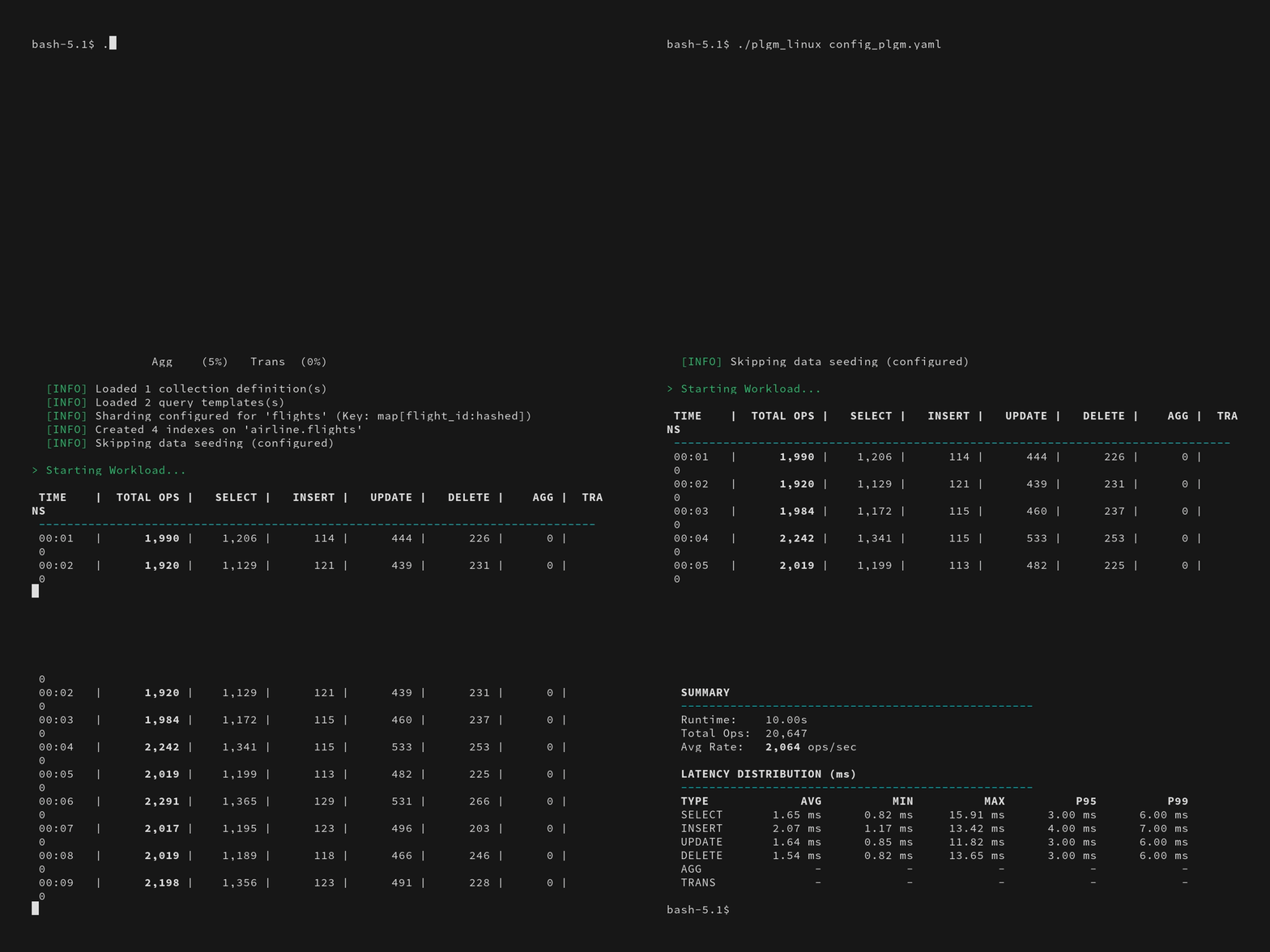
./plgm_linux config_plgm.yaml

Sample Output:

Collection stats:

[direct: mongos] airline> printjson(statsPick("flights"));
{
  sharded: true,
  size: 28088508,
  count: 14591,
  numOrphanDocs: 0,
  storageSize: 15900672,
  totalIndexSize: 4943872,
  totalSize: 20844544,
  indexSizes: {
    _id_: 659456,
    flight_id_hashed: 921600,
    'flight_id_1_equipment.plane_type_1': 1163264,
    seats_available_1_flight_id_1: 712704,
    duration_minutes_1_seats_available_1_flight_id_1: 978944,
    'equipment.plane_type_1': 507904
  },
  avgObjSize: 1925,
  ns: 'airline.flights',
  nindexes: 6,
  scaleFactor: 1
}

Sample document structure:

[direct: mongos] airline> db.flights.findOne()
{
  _id: ObjectId('695eca4be9d9322e2aae97eb'),
  agent_email: 'myrticethompson@ratke.com',
  duration_minutes: 841436202,
  flight_id: 1491473635,
  origin: 'Greensboro',
  gate: 'F20',
  seats_available: 2,
  passengers: [
    {
      seat_number: '5E',
      passenger_id: 1,
      name: 'Janet Miller',
      ticket_number: 'TCK-15920051'
    },
    {
      name: 'Keagan Reynolds',
      ticket_number: 'TCK-71064717',
      seat_number: '8A',
      passenger_id: 2
    },
    ... ommitted remaining passenger list for brevity ....
  ],
  agent_first_name: 'Earnest',
  agent_last_name: 'Thompson',
  flight_date: ISODate('2025-03-24T15:04:11.182Z'),
  destination: 'Chicago',
  flight_code: 'NM855',
  equipment: {
    plane_type: 'Boeing 777',
    total_seats: 43,
    amenities: [
      'Priority boarding',
      'Extra legroom',
      'Power outlets',
      'WiFi',
      'Hot meals'
    ]
  }
}

Benchmarks

Now that you are familiar with how to use the application, we can proceed with the benchmarks. I have run six different workloads (detailed below) and provided an overall analysis demonstrating the benefits of using Percona Load Generator for MongoDB to test your cluster.

Workload #1

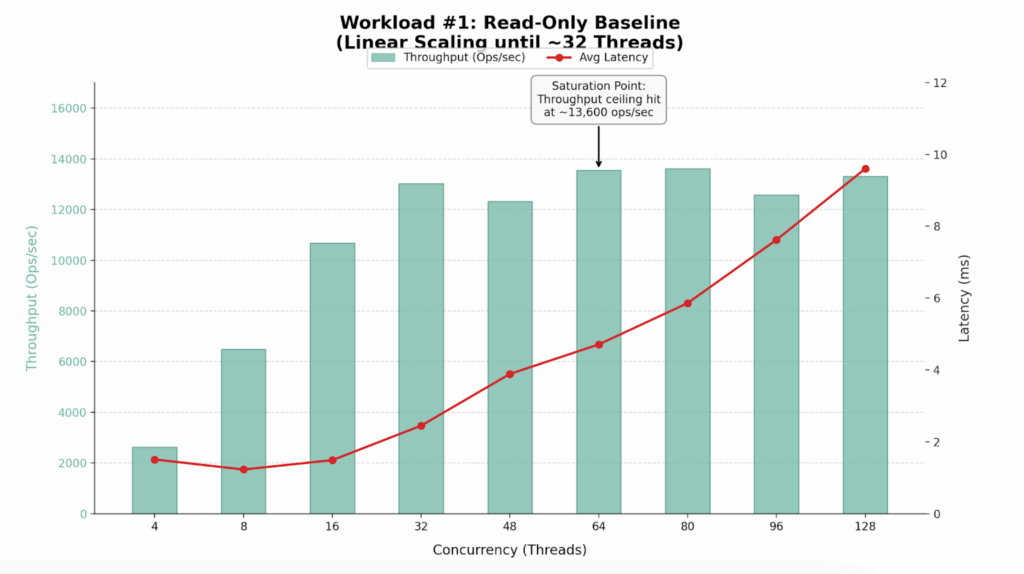
We began with a read-only workload to establish the theoretical maximum throughput of the cluster. We configured plgm to execute 100% find() operations targeting a specific shard key, ensuring efficient, index-optimized queries (this was defined in our custom queries.json file, you can see the readme for further details).

for x in 4 8 16 32 48 64 80 96 128; do  PLGM_PASSWORD=****  
PLGM_CONCURRENCY=${x}  PLGM_QUERIES_PATH=queries.json  PLGM_FIND_PERCENT=100  PLGM_REPLICASET_NAME="" 
PLGM_URI="mongodb://dan-ps-lab-mongos00.tp.int.percona.com:27017,dan-ps-lab-mongos01.tp.int.percona.com:27017" 
./plgm_linux config_plgm.yaml ;  sleep 15; done

Performance Results

Workers (Threads) Throughput (Ops/Sec) Avg Latency (ms) Efficiency Verdict
4 2,635 1.51 Underutilized
8 6,493 1.23 Efficient Scaling
16 10,678 1.49 Efficient Scaling
32 13,018 2.45 Sweet Spot
48 12,322 3.89 Saturation Begins
64 13,548 4.71 Max Throughput
80 13,610 5.86 High Latency / No Gain
96 12,573 7.62 Degraded Performance
128 13,309 9.60 Oversaturated

Findings

  • The cluster performs best with 32 to 64 concurrent workers.
  • The cluster hits a “performance wall” at approximately 13,600 Ops/Sec.
  • Latency remains excellent (<5ms) up to 64 threads but degrades significantly (spiking to >200ms) at 96+ threads without yielding additional throughput.
  • The ceiling at ~13.5k ops/sec suggests a CPU bottleneck on the single node

Analysis

  • Linear Scaling (4-32 Threads): The cluster demonstrates near-perfect scalability. The hardware handles requests almost instantly.
  • Saturation (48-64 Threads): Moving from 32 to 64 threads increases throughput by only ~4%, but latency doubles. The CPU is reaching capacity.
  • Degradation (80+ Threads): This is classic “Resource Contention.” Requests spend more time waiting in the CPU queue than executing.

Workload #2

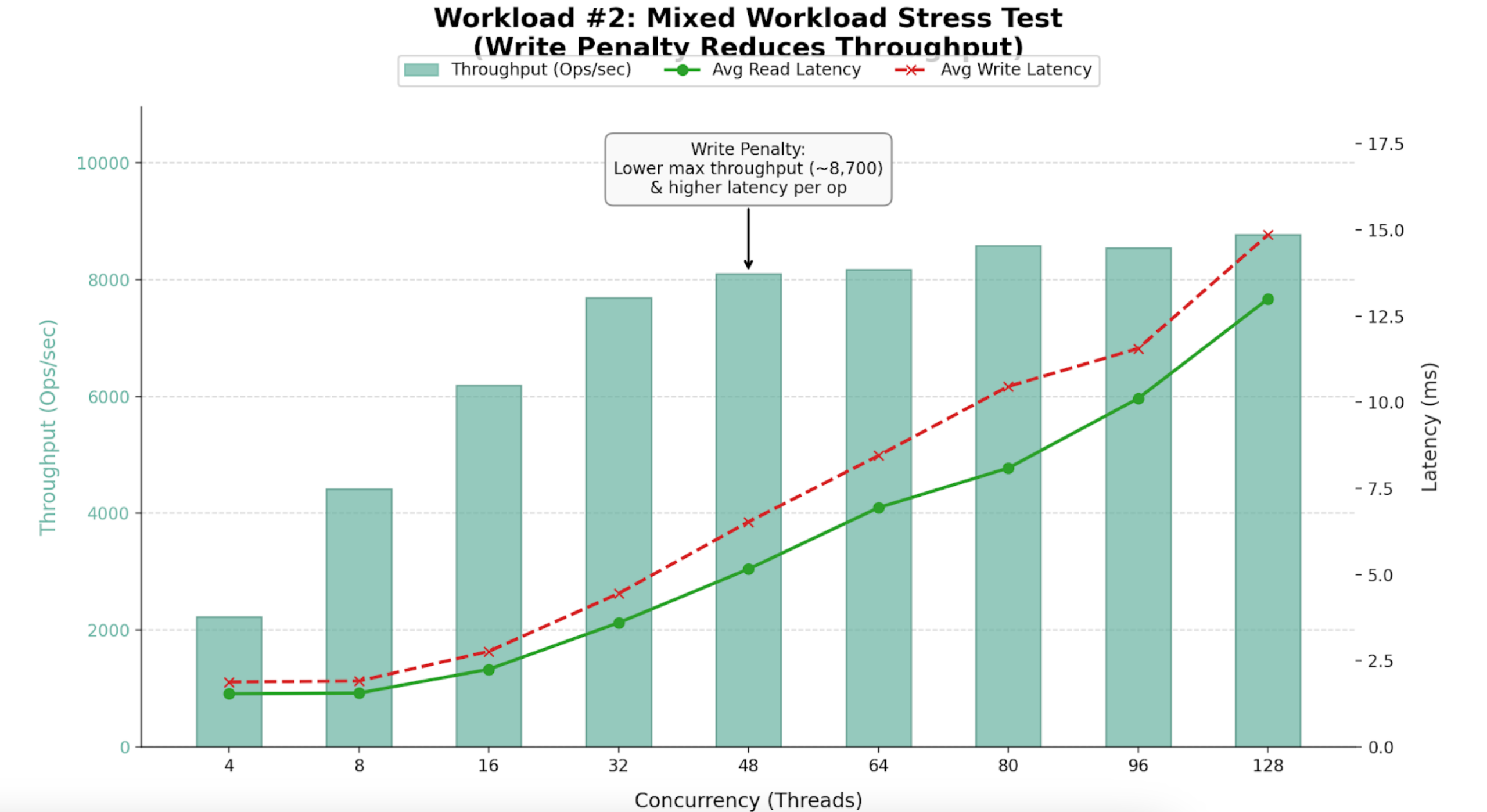
Following our baseline scenario, we conducted a mixed workload test (54% Reads, 46% Writes), using the same query definitions as the first workload.

for x in 4 8 16 32 48 64 80 96 128; do  PLGM_PASSWORD=****  PLGM_CONCURRENCY=${x}  PLGM_QUERIES_PATH=queries.json PLGM_REPLICASET_NAME=""  
PLGM_URI="mongodb://dan-ps-lab-mongos00.tp.int.percona.com:27017,dan-ps-lab-mongos01.tp.int.percona.com:27017" 
./plgm_linux config_plgm.yaml ;  sleep 15; done

Performance Results

Workers (Threads) Throughput (Ops/Sec) Avg Read Latency (ms) Avg Write Latency (ms) Efficiency Verdict
4 2,225 1.54 1.88 Underutilized
16 6,195 2.25 2.77 High Efficiency
32 7,689 3.60 4.45 Sweet Spot
48 8,096 5.16 6.53 Saturation Begins
64 8,174 6.94 8.45 Max Stability
96 8,545 10.11 11.56 Diminishing Returns
128 8,767 13.00 14.86 Oversaturated


Findings

  • Maximum sustained throughput dropped to ~8,700 Ops/Sec.
  • Introducing 46% writes reduced capacity by ~35% compared to the read-only benchmark.
  • Performance peaks between 32 and 64 threads.

Analysis

  • Throughput drops from 13.5k to 8.7k due to the overhead of locking, Oplog replication, and journaling required for writes.
  • The Saturation Point: Up to 32 threads, throughput scales linearly. Beyond 64 threads, adding workers yields almost no extra throughput but causes latency to spike to 13-15ms.

Workload #3

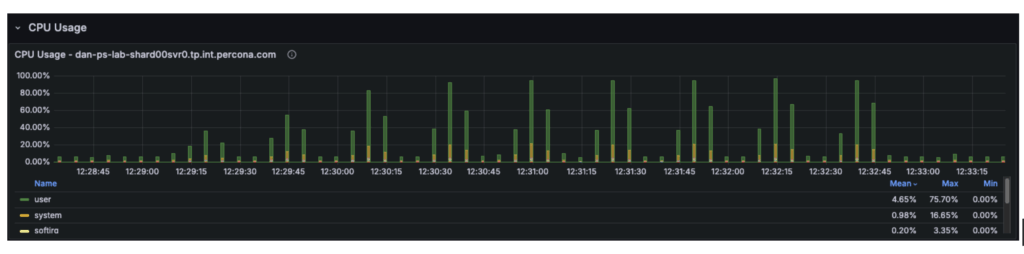
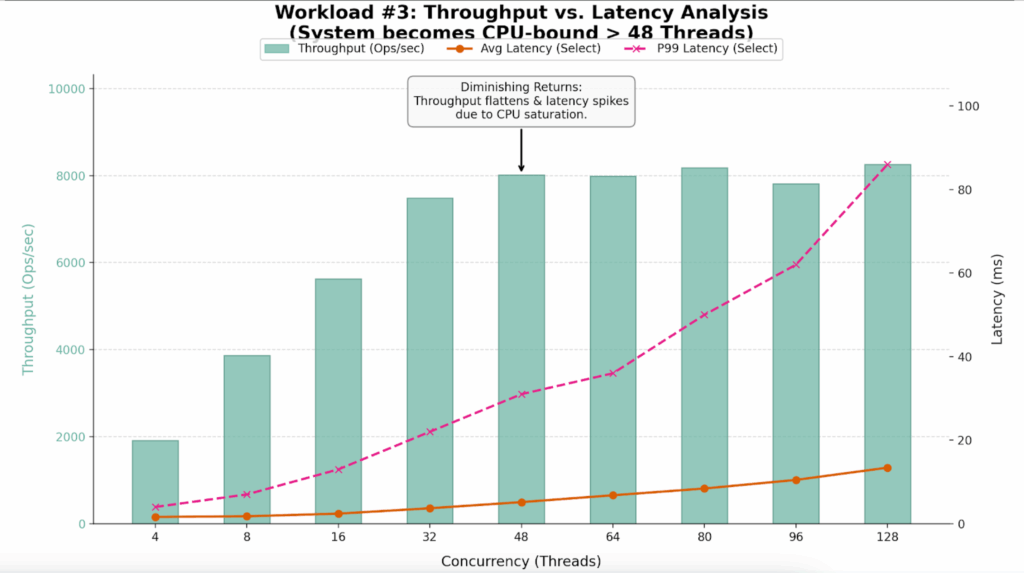
The third workload was executed using a different workload definition (the default), in contrast to the previous two tests that used queries.json. This workload was also a mixed workload test (54% reads and 46% writes). We conducted an analysis to identify the point at which hardware limitations began introducing scalability constraints in the system. By correlating plgm’s granular throughput data with system telemetry, we were able to pinpoint the specific resource bottleneck responsible for the performance plateau.

for x in 4 8 16 32 48 64 80 96 128; do  PLGM_PASSWORD=****  PLGM_CONCURRENCY=${x} PLGM_REPLICASET_NAME=""  
PLGM_URI="mongodb://dan-ps-lab-mongos00.tp.int.percona.com:27017,dan-ps-lab-mongos01.tp.int.percona.com:27017" 
./plgm_linux config_plgm.yaml ;  sleep 15; done

Performance Results

The table below highlights the “Diminishing Returns” phase clearly visible in this run.

Workers (Threads) Throughput (Ops/Sec) Avg Latency (ms) P99 Latency (ms) Efficiency Verdict
4 1,909 1.62 4.00 Underutilized
16 5,631 2.40 13.00 Linear Scaling
32 7,488 3.69 22.00 Sweet Spot
48 8,014 5.16 31.00 Saturation Point
64 7,991 6.80 36.00 Plateau
80 8,179 8.42 50.00 Latency Spike
96 7,811 10.48 62.00 Performance Loss
128 8,256 13.41 86.00 Severe Queuing


Findings

  • The system saturates between 32 and 48 threads.
  • At 32 threads, the system is efficient (7,488 Ops/Sec). By 48 threads, throughput gains flatten (8,014 Ops/Sec), but latency degrades by 40%.
  • While average latency looks manageable, P99 (Tail) Latency triples at high load, ruining the user experience.

Analysis

  • Throughput effectively flatlines around 8,000 Ops/Sec after 48 threads. The variance between 48 threads (8,014 Ops) and 128 threads (8,256 Ops) is negligible, yet the cost in latency is massive.
  • The P99 column reveals the hidden cost of oversaturation. At 128 threads, 1% of users are waiting nearly 100ms for a response, compared to just 22ms at the optimal 32-thread level.
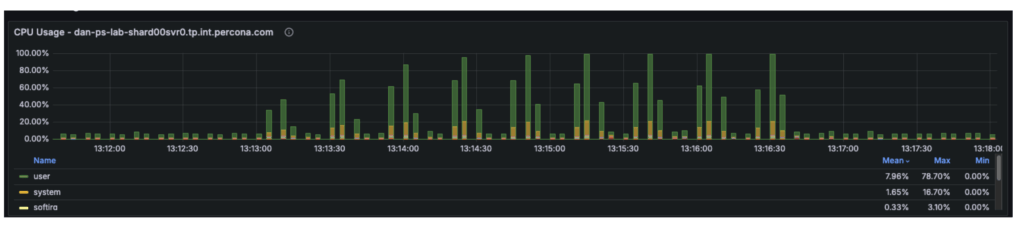
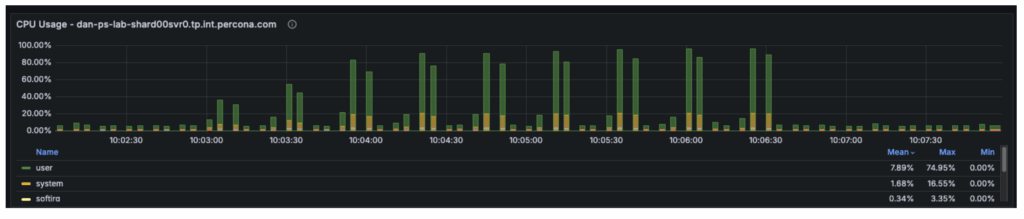
  • Telemetry confirmed that at 48+ threads, the User CPU usage hit 80% and System CPU hit 16%. With the total CPU utilization at 96%, the 4 vCPUs were fully saturated, leaving requests waiting in the run queue.

Potential Improvements

Enabling secondary reads could be one of the most impactful “quick wins” for certain workload configurations. The sections below explain why this change could be beneficial, how much improvement it can provide, and the trade-offs involved.

The cluster is a three-node replica set, and our observations were as follows:

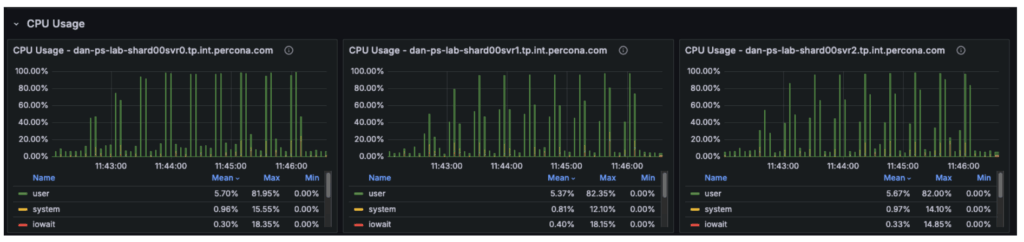
  • Node 1 (Primary): Running at 100% CPU, handling all writes (insert/update/delete) and all reads (select).
  • Node 2 (Secondary): Largely idle, only applying replication logs.
  • Node 3 (Secondary): Largely idle, only applying replication logs.

Although the cluster has 12 vCPUs in total, the workload is constrained by only 4 vCPUs on the primary. The remaining 8 vCPUs on the secondary nodes are underutilized.

Assumptions

With secondary reads enabled:

  • The 54% read workload (select operations) is moved off the primary and distributed across the two secondary nodes.
  • The primary is freed to focus its CPU resources almost entirely on write operations.
  • Read capacity increases significantly, as two nodes are now dedicated to serving reads rather than one.
  • The primary no longer processes approximately 4,700 reads per second, recovering roughly 50% of its CPU capacity for write operations.

Overall cluster throughput should increase from approximately 8,700 ops/sec to 12,000+ ops/sec, with the remaining limit determined primarily by the primary node’s write capacity.

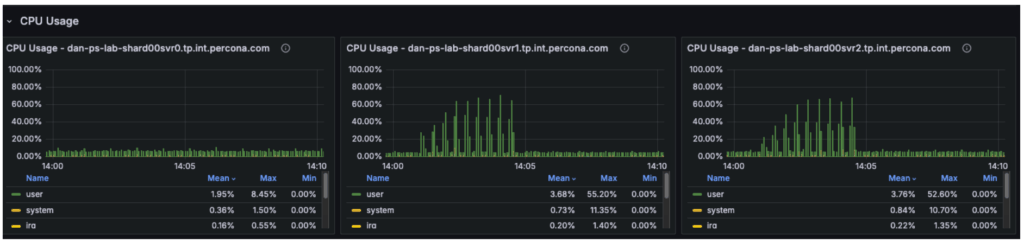
The graph below illustrates that in previous tests, the secondary nodes carried almost no workload, while the primary was fully saturated.

Trade-offs: Eventual Consistency

The “catch” is stale reads. MongoDB replication is asynchronous. There is a delay (usually milliseconds) between data being written to the Primary and appearing on the Secondary.

&nbsp;

  • Scenario: A user books a flight (Insert). The page immediately refreshes to show “My Bookings” (Select).
  • Risk: If the Select hits a Secondary that hasn’t caught up yet, the new flight won’t appear for a few milliseconds.
  • Mitigation: For a flight search/booking system, searching for flights (secondaryPreferred) is usually fine, but checking your own confirmed booking should usually stay on the primary (primaryPreferred)
  • This approach is not recommended for such workloads where consistent reads are a requirement

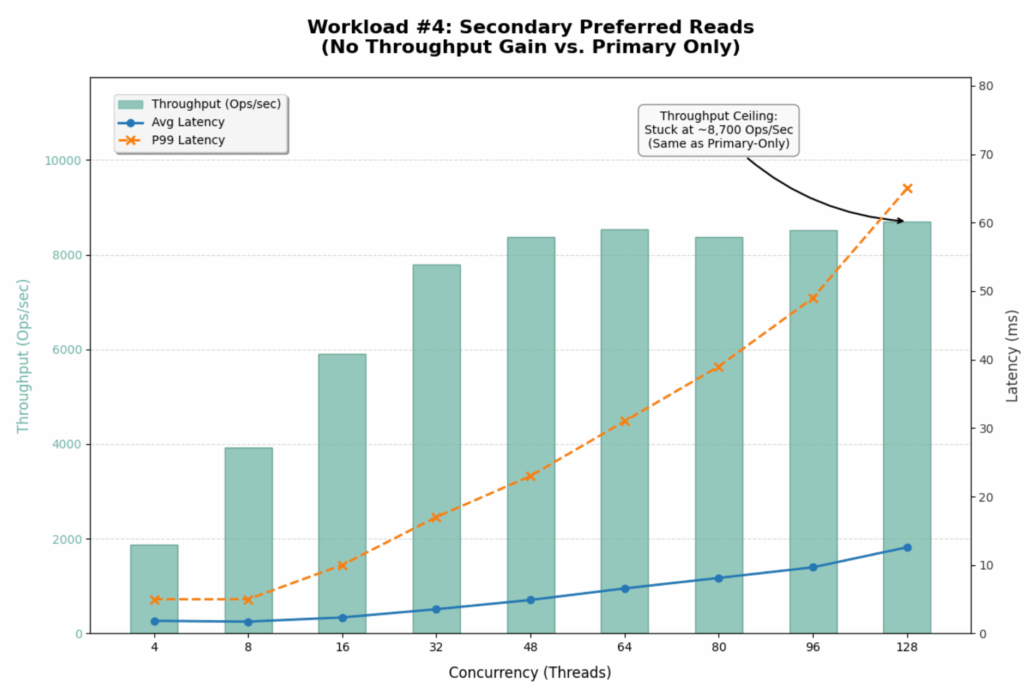
Workload #4

To validate our assumptions, we can reconfigure PLGM, rather than making any changes to the infrastructure. This is one of the key advantages of using a benchmarking tool like plgm: you can modify workload behavior through configuration instead of altering the environment. 

PLGM supports providing additional URI parameters either through its configuration file or via environment variables. We will use an environment variable so that no configuration files need to be modified. (For more details on available options, you can run ./plgm_linux –help or refer to the documentation

We will run the same mixed workload as above and compare the results using the following setting:

PLGM_READ_PREFERENCE=secondaryPreferred

for x in 4 8 16 32 48 64 80 96 128; do  PLGM_PASSWORD=****  PLGM_CONCURRENCY=${x} PLGM_REPLICASET_NAME="" PLGM_READ_PREFERENCE="secondaryPreferred"  
PLGM_URI="mongodb://dan-ps-lab-mongos00.tp.int.percona.com:27017,dan-ps-lab-mongos01.tp.int.percona.com:27017" 
./plgm_linux config_plgm.yaml ;  sleep 15; done

Analysis

The introduction of readPreference=secondaryPreferred yielded almost no performance improvement. In fact, it slightly degraded performance at high concurrency.

Metric Primary Only Secondary Preferred  Change
Max Throughput ~8,700 Ops/Sec ~8,700 Ops/Sec 0% (No Gain)
Saturation Point ~48 Threads ~48 Threads Identical
P99 Latency (128 Threads) 86 ms 65 ms ~24% Better
Avg Select Latency (128 Threads) 13.41 ms 12.59 ms Marginal Gain

This result strongly suggests that the Secondaries were already busy or that the bottleneck is not purely CPU on the Primary.

  1. Replication Lag / Oplog Contention:
    • Since our workload is 46% Writes, the Secondaries are busy just applying the Oplog to keep up with the Primary.
    • MongoDB replication is single-threaded (or limited concurrency) for applying writes in many versions.
    • By forcing reads to the Secondaries, you are competing with the replication thread. If the Secondary falls behind, it has to work harder, and read latency suffers.

  2. Sharding Router Overhead (mongos):
    • The bottleneck could also be the mongos routers or the network bandwidth between the mongos and the shards, rather than the shard nodes themselves.
    • If mongos is CPU saturated, it doesn’t matter how many backend nodes you have; the throughput won’t increase.

  3. Global Lock / Latch Contention:
    • At 46% writes, you might be hitting collection-level or document-level lock contention that no amount of read-replica scaling can fix.

Offloading reads to secondaries did not unlock hidden capacity for this specific write-heavy workload. The cluster is fundamentally limited by its ability to process the 46% write volume.

Workload #5

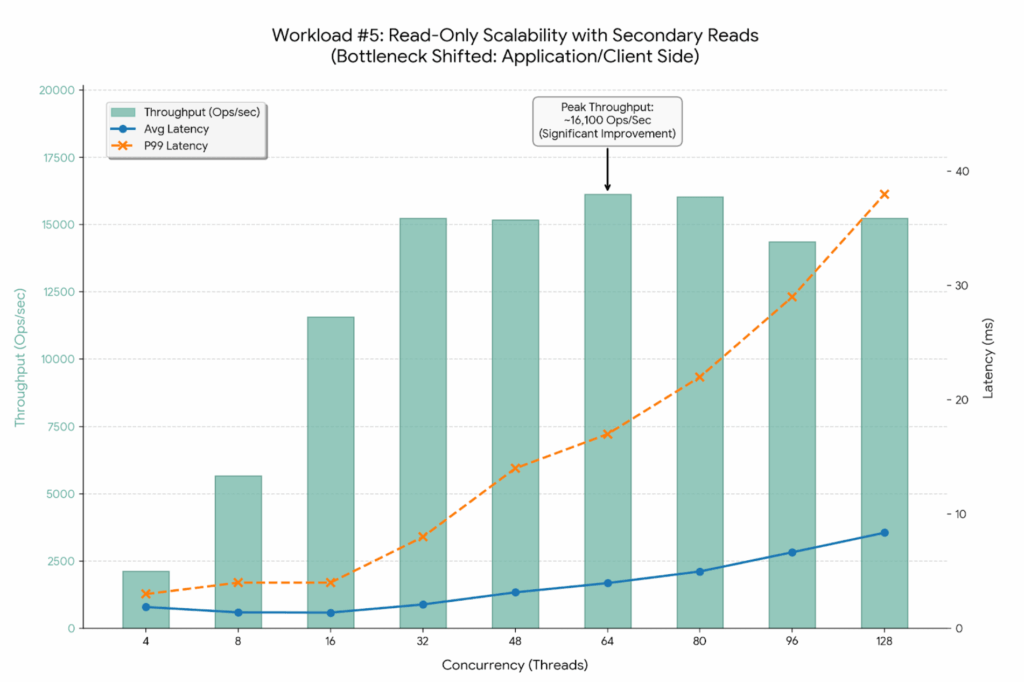
By switching to 100% Reads (PLGM_FIND_PERCENT=100) combined with Secondary Reads (PLGM_READ_PREFERENCE=secondaryPreferred), we have successfully shifted the bottleneck away from the single Primary node. The improvement is dramatic.

for x in 4 8 16 32 48 64 80 96 128; do PLGM_FIND_PERCENT=100 PLGM_PASSWORD=****  PLGM_CONCURRENCY=${x} PLGM_REPLICASET_NAME="" PLGM_READ_PREFERENCE="secondaryPreferred"  
PLGM_URI="mongodb://dan-ps-lab-mongos00.tp.int.percona.com:27017,dan-ps-lab-mongos01.tp.int.percona.com:27017" 
./plgm_linux config_plgm.yaml ;  sleep 15; done

Analysis

The graph below visualizes this new “unlocked” scalability. Notice how the latency lines (Blue and Orange) stay much flatter for much longer compared to previous tests.

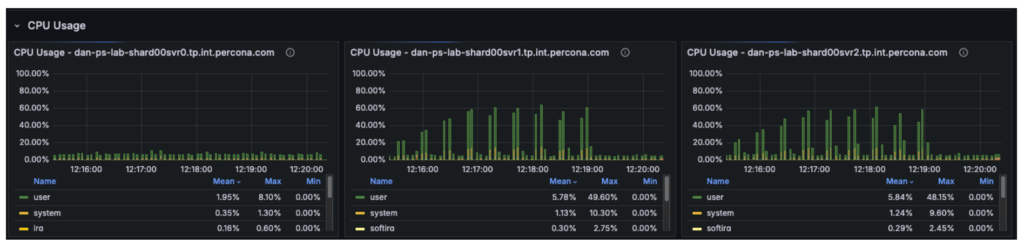
The CPU metrics and “Command Operations” charts confirm our hypothesis regarding the shift in resource utilization:

  • Primary Node (svr0): CPU usage has dropped significantly. With read operations offloaded, the primary node is now essentially idle, handling only metadata updates and the replication oplog.
  • Secondary Nodes (svr1, svr2): These nodes have taken over the heavy lifting, with CPU utilization rising to approximately 50-60%.
  • The New Bottleneck: Since the backend secondary nodes are operating at only ~50% capacity, the database cluster itself is no longer saturated. The observed throughput plateau at ~16,000 Ops/Sec indicates the bottleneck has moved upstream. Potential candidates for this new limit include:
    • Client-Side Saturation: The machine running the plgm load generator may have reached its own CPU or network limits.
    • mongos Router Limits: The two router nodes might be hitting their limits for concurrent connections or packet processing.
    • Network Bandwidth: The environment may be hitting the packet-per-second (PPS) ceiling of the virtual network interface.

This represents the ideal outcome of a scaling exercise: the database has been tuned so effectively that it is no longer the weak link in the application stack.

Performance Gains Summary

By optimizing the workload configuration, we achieved significant improvements across all key metrics:

  • Throughput Increase:
    • Previous Baseline (Primary Only): Maxed out at ~13,600 Ops/Sec.
    • New Configuration (Secondary Preferred): Maxed out at ~16,132 Ops/Sec.
    • Total Improvement: A ~19% increase in peak throughput.

  • Latency Stability:
    • Average Latency: At peak throughput (64 threads), average latency improved to 3.96ms, down from 4.71ms in the Primary-Only test.
    • P99 (Tail) Latency: Stability has improved dramatically. Even at 128 threads, P99 latency is only 38ms, a massive reduction from the 320ms observed in the Primary-Only test.

Workload #6

This workload represents the ideal scenario for a read-heavy application. It uses the same workload as the baseline test, with the only difference being the implementation of the secondaryPreferred option. By shifting 100% of the read traffic to the two secondary nodes, the system effectively triples its read capacity compared to the single-primary-node baseline.

for x in 4 8 16 32 48 64 80 96 128; do  PLGM_READ_PREFERENCE=secondaryPreferred PLGM_PASSWORD=****  PLGM_CONCURRENCY=${x}  PLGM_QUERIES_PATH=queries.json  
PLGM_FIND_PERCENT=100  PLGM_REPLICASET_NAME="" 
PLGM_URI="mongodb://dan-ps-lab-mongos00.tp.int.percona.com:27017,dan-ps-lab-mongos01.tp.int.percona.com:27017" 
./plgm_linux config_plgm.yaml ;  sleep 15; done

Analysis

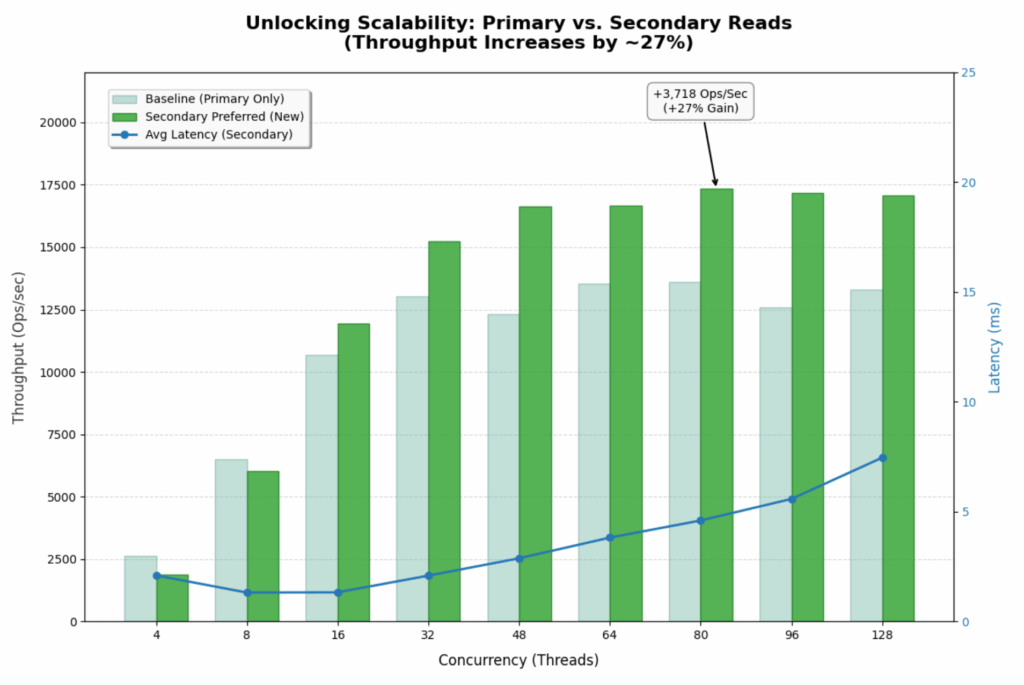
The graph below shows how the throughput bars continue to climb steadily all the way to 80-96 threads. The system is no longer hitting a hard “wall” at 48 threads. 

  • Previous Baseline (Primary Only): Maxed out at ~13,600 Ops/Sec.
  • New Configuration (Secondary Preferred): Maxed out at ~17,328 Ops/Sec.
  • Improvement: ~27% increase in peak throughput.

Latency Stability

  • Average latency remains incredibly low (<5ms) even at very high concurrency. At 64 threads, it is 3.82ms vs 4.71ms in the baseline.
  • Tail Latency (P99) is the most impressive stat. At 128 threads, P99 latency is only 32ms. In the Primary-Only test, it was 320ms. That is a 10x improvement in user experience stability under load.

Bottleneck

  • The flatlining of throughput around 17k-18k ops/sec suggests you are no longer bound by database CPU. You are likely hitting limits on the client side (PLGM) or the network layer. The database nodes are happily processing everything you throw at them.

Conclusion: The Art of Precision Benchmarking

By using PLGM (Percona Load Generator for MongoDB) and telemetry, we were able to do far more than just “stress test” the database. We were able to isolate variables and incrementally step up concurrency. This precision allowed us to test different scenarios and tell a better story:

  1. We identified the raw CPU ceiling of a single Primary node at 13.5k Ops/Sec.
  2. We revealed how a realistic “Mixed Workload” (46% writes) slashes that capacity by 35%, proving that write-heavy systems cannot simply be scaled by adding more read replicas.
  3. By isolating a read-heavy scenario on Secondaries, we shifted the bottleneck entirely. We moved the constraint from the database hardware to the application layer, unlocking a 20%+ throughput gain and drastically stabilizing tail latency.

The Next Frontier: Application-Side Tuning

Our final test revealed an important shift in system behavior: the database is no longer the primary bottleneck. While backend nodes were operating at only ~50% utilization, overall throughput plateaued at approximately ~18k Ops/Sec, indicating the constraint has moved upstream. The performance limit now likely resides in the application server, the network layer, or the load generator itself, and future optimization efforts should focus on the following areas:

  • Analyzing the application code for thread contention or inefficient connection handling.
  • Query optimization
  • Investigating packet limits and network bandwidth saturation
  • Vertical scaling of the application servers to ensure they can drive the high-performance database cluster we have now optimized.

This is the ultimate goal of database benchmarking: to tune the data layer so effectively that it becomes invisible, forcing you to look elsewhere for the next leap in performance.

The post The Importance of Realistic Benchmark Workloads appeared first on Percona.

Announcing Percona ClusterSync for MongoDB: The Open Source Trail to Freedom

$
0
0

Migrating mission-critical databases is often compared to changing the engines on a plane while it’s in mid-flight. For MongoDB users, this challenge has been historically steep, often involving complex workarounds or proprietary tools that keep you locked into a specific ecosystem.

Today, we are thrilled to announce the General Availability of Percona ClusterSync for MongoDB (PCSM). This new addition to the Percona Software for MongoDB suite is a powerful, cluster-to-cluster synchronization tool designed to make migrations between Percona Server for MongoDB and genuine MongoDB databases as seamless as possible.

PCSM is designed to enable near-zero downtime migrations from MongoDB Atlas or MongoDB Community / Enterprise Advanced, or when simply moving between different environments.

What is Percona ClusterSync for MongoDB?

At its core, PCSM is a synchronization engine that facilitates high-speed data transfer (data clone) and real-time replication between two MongoDB clusters. By utilizing MongoDB Change Streams, PCSM ensures that every insert, update, delete, and DDL operations on your source cluster is reflected on the target with minimal latency.

Key Technical Highlights:

  • Replica Set and Sharded Topology: PCSM is built for modern architectures. It natively supports both replica set and sharded cluster topologies, allowing you to scale your migration strategy to match your production needs.
  • Real-time Replication: After the initial data “cloning” phase, PCSM enters a continuous sync state, keeping the target cluster up-to-date until you are ready for the final cutover.
  • Near-Zero Downtime Migrations: Because the source remains fully writable during the sync, you can perform migrations with near-zero application downtime.
  • Versatile Use Cases: Beyond migrations, PCSM is an excellent tool for:
    • Disaster Recovery: Maintaining a “cold-copy” or secondary cluster in a different region.
    • Load Testing: Creating a real-time clone of production data to test application performance under stress without impacting live users.

The Open Source Difference: Navigating the Competition

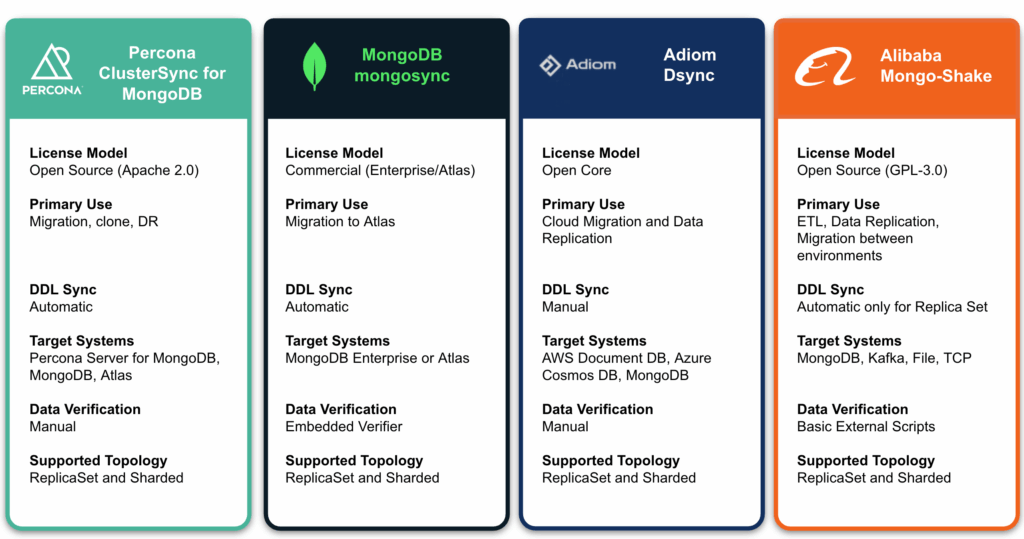
Choosing the right synchronization tool is a pivotal decision for any database administrator. With the General Availability of Percona ClusterSync for MongoDB, the market now has a reliable, 100% open source alternative to proprietary and open-core tools.

Percona ClusterSync for MongoDB

Percona ClusterSync for MongoDB stands out as a genuine open-source alternative. It provides the reliability and vendor-backed quality that enterprises demand, without the restrictive licensing or “walled garden” approach of proprietary tools. With Percona, you get the software for free and have the option to lean on our world-class support team to ensure your migration is successful.

MongoDB mongosync

The official utility from MongoDB Inc., specifically built for moving workloads into Atlas or between Enterprise clusters. It uses Change Streams for high-level replication.

  • Limitation: It is strictly tied to Enterprise Advanced or Atlas deployments. 

Adiom dsync

A lightweight, single-binary tool optimized for high-speed migrations, particularly from MongoDB to Azure Cosmos DB. It is popular for its simplicity and “zero-storage” transfer.

  • Limitation: The open-source version is highly restricted. It does not replicate indexes or DDL statements, meaning you must manually set up your schema and indexes on the destination. It also lacks conflict resolution, defaulting to overwriting data. Large databases also require a commercial license. See details in their Adiom’s dsync documentation page.

Alibaba Mongo-Shake

A “universal platform” that treats the Oplog as a stream. It is the best choice if your target isn’t a database—for example, if you need to pipe MongoDB changes directly into Apache Kafka.

  • Limitation: The open-source version lacks Active-Active setup support, which is present in Alibaba’s internal version. It’s challenging to set up such an environment without complex manual namespace filtering to prevent infinite loops. Additionally, DDL operations are not synchronized from sharded clusters. For details, refer to their GitHub repository for Mongo-Shake.

Current State: Version 0.7.0 and the Road Ahead

We are currently at the 0.7.0 release stage, which marks our General Availability (GA). The GA status indicates that the tool has met the stability and reliability milestones required for enterprise use. You can confidently deploy it in production for data migration across replica sets with near-zero downtime. This release also introduces data replication in sharded clusters, currently in a technical preview stage. While not yet GA, this feature is available for testing. We encourage you to try it in non‑production environments and share feedback to help shape future improvements. We have already received fantastic feedback regarding its reliability in the field, and we are just getting started. 

Being in this early stage means that while the core engine is rock-solid, we have a packed roadmap for 2026. You can expect major feature additions—including performance boosts, better index build control management, and replica set to sharding replication—as we move toward the milestone 1.0.0 release later this year.

Join the Community

Percona thrives on community collaboration. As we continue to refine PCSM and celebrate its production-ready GA release, we invite you to get involved. We welcome reports of bugs, suggestions for new features, and code contributions. Your input helps us build the tools the MongoDB community actually needs. We encourage you to deploy PCSM in your production environments today! Check out the PCSM repository and join the journey with us!

Ready to break free from vendor lock-in? Check out the PCSM Documentation to get started with your first sync today.

&nbsp;

The post Announcing Percona ClusterSync for MongoDB: The Open Source Trail to Freedom appeared first on Percona.
From Feature Request to Release: How Community Feedback Shaped PBM’s Alibaba Cloud Integration

$
0
0

At Percona, we’ve always believed that the best software isn’t built in a vacuum—it’s built in the open, fueled by the real-world challenges of the people who use it every day. Today, I’m excited to walk you through a journey that perfectly illustrates this: the road from a JIRA ticket to native Alibaba Cloud Object Storage Service (OSS) support in Percona Backup for MongoDB (PBM).

While this feature announcement might not be a surprise, having been mentioned in the Percona Backup for MongoDB 1.12.0 Release Notes, this is more than just a technical update –  it’s the great story behind it. It’s a partnership between an engaged community member and the Percona engineering team.

The Spark: A Challenge and a Commitment

This, like many stories you’ve heard, started with a Jira ticket. A user in the Alibaba Cloud ecosystem hit a wall: PBM’s standard S3 implementation was incompatible with Alibaba’s Object Storage Service (OSS) due to specific encoding requirements (aws-chunked). But this story took a turn from “feature request” to “active collaboration” almost immediately. The user didn’t just report the issue; they reached out and told us, “I want to build this. Can you help me get started?”

Eleven Days to Code

The speed of open source collaboration can be breathtaking when the right people come together. Just 11 days after that initial conversation, a GitHub Pull Request was live.

The contributor didn’t just throw code over the fence. They took a rigorous approach:

  • Validation: They utilized PBM’s built-in storage test utility to verify the implementation.
  • End-to-End Testing: They confirmed that not only were backups and lists working, but that restoration—the most critical part of any backup tool—was seamless on Percona Server for MongoDB.

The following week, our engineers jumped into the GitHub thread. Internally, we recognized the value of this contribution immediately. We aligned on a priority path to get this into the very next release window, ensuring the contributor’s hard work reached the community as quickly as possible.

Contributor Spotlight: A Conversation with the Author

To gain a deeper understanding of this journey, I sat down (virtually) with Imre Nagi – the contributor behind the PR, to discuss his experience.

What was the specific challenge in your Alibaba Cloud environment that made you decide to move from filing a request to personally writing the code?

We recently transitioned from GCP/AWS to Alibaba Cloud. While PBM supports an S3-compatible interface to interact with Alicloud OSS, our security restriction, which dictates the use of an Alicloud RAM Role, has become the main blocker to using the PBM S3 implementation. It was simply because the Alicloud RAM role doesn’t work with that S3 interface. That’s why I decided to implement an Alibaba Cloud OSS implementation in PBM with Assume RAM role support.

You had a working PR ready in just 11 days. What was your experience like collaborating with the Percona engineering team during that rapid turnaround? 

It was fun. I received some feedback about the PR, and most importantly, I was given a clear timeline/ETA for when this feature could be merged into the upstream. Knowing this really helped me make an internal decision on what we could do while waiting for the feature to be merged. I really appreciate it.

You used the PBM storage test utility and performed restoration tests. How did those tools help you feel confident in your contribution? 

Before the implementation was merged into upstream, we had been running it in production for some time, and it worked for us. I suppose that was a valuable contribution to the open-source community.

Why was it important to you that this feature be part of an entirely open source tool like PBM? 

We are using PBM for our MongoDB backup. Contribution to the community is the least we can do. Hopefully, it can benefit the open source community.

Thank you again, Imre! Big Kudos!

Beyond the Code: A Full Partnership

True Open Source isn’t just about merging a Pull Request; it’s about stewardship. While the contributor was busy even updating our documentation via a second PR to ensure users knew how to use the new feature, Percona’s team went to work behind the scenes.

To ensure this was “Percona-grade,” we didn’t just supervise the code; we reinforced it:

  • CI Integration: We integrated the Alibaba Cloud SDK into our Continuous Integration pipelines.
  • Rigorous Testing: Our QA teams performed exhaustive performance and end-to-end (E2E) testing.
  • Refinement: We worked closely with the contributor to polish the Go implementation to meet the highest standards of the PBM architecture.

The result is a solution that the community and our enterprise customers can rely on with 100% confidence.

Why Choose Percona Over ApsaraDB for MongoDB?

This blog post is also a moment to reaffirm what makes Percona different. Many users in the Alibaba ecosystem initially look at ApsaraDB for MongoDB, the platform’s managed service. However, we increasingly see power users and enterprises moving their workloads to Percona Server for MongoDB (running on ECS or hybrid clouds) and using PBM for several reasons:

  • ApsaraDB is a proprietary DBaaS. Once your data and backup logic are tied to their specific APIs and ecosystem, moving out becomes a massive undertaking. Percona gives you “Cloud-native” performance with “Cloud-agnostic” freedom.
  • ApsaraDB’s pricing can be complex, especially with “hidden” costs for snapshots and storage. With PBM and OSS, you pay only for the raw storage you use, with no additional “enterprise” tax.
  • ApsaraDB often gates advanced features (like certain Point-in-Time Recovery or audit logging options) behind higher tiers. Percona offers enterprise-grade features, including PITR, physical backups, and advanced security—all 100% open source.
  • Hybrid Flexibility: PBM allows you to back up an on-premises cluster to Alibaba OSS, or vice versa. ApsaraDB is largely restricted to its own environment.

Percona Backup for MongoDB is—and will remain—100% open source. Whether you are running a single node or a massive global cluster, the native Alibaba Cloud integration is available to you for free. We believe that robust, secure backups are a fundamental right for the database community, not a premium add-on.

Why This Matters

This journey proves that Percona is a platform for your contributions. When you see a gap, you have the power to help close it, and we are here to provide the engineering support, testing infrastructure, and documentation to make your contribution world-class.

To our contributor, Imre Nagi: Thank you for your leadership on PBM-1588. You’ve made PBM better for thousands of users in the Alibaba Cloud ecosystem.

Ready to see what the community built? Check out our Alibaba Cloud Object Storage Service documentation to see how to configure your oss storage provider today.

The post From Feature Request to Release: How Community Feedback Shaped PBM’s Alibaba Cloud Integration appeared first on Percona.

PSMDB Sandbox: A Browser-Based UI for Deploying MongoDB with Terraform and Ansible

$
0
0

If you’ve ever wrestled with .tfvars files, juggled Ansible inventory paths, or tried to remember the exact command sequence for a MongoDB setup — this post is for you.

PSMDB Sandbox is a lightweight web frontend built in Go that ships inside the Percona MongoDB Automation repository. It puts a clean browser interface on top of the full Terraform + Ansible automation stack, so you can spin up, manage, and tear down MongoDB environments without ever touching a config file by hand.

This project was built using vibe coding — the result is a fully functional application developed rapidly without writing every line from scratch. It’s a great example of how AI-assisted development can accelerate tooling projects that would otherwise sit in the backlog forever.

Why a Web UI?

The mongo_terraform_ansible project already automates a lot: it can deploy Percona Server for MongoDB (PSMDB), Percona Backup for MongoDB (PBM), and Percona Monitoring and Management (PMM) across AWS, GCP, Azure, Docker, and Libvirt/KVM. That’s powerful — but the workflow traditionally meant editing .tfvars files, running commands in the right order, and tracking state in your head.

The Go UI changes that. It wraps the same Terraform and Ansible automation in a wizard-style interface, streams live output to your browser, and keeps track of environment state so you always know what’s running, stopped, or in progress.

It’s particularly useful as a testing sandbox for PSMDB features. You can quickly spin up a replica set or sharded cluster, test backup and restore workflows with PBM, explore audit logging, and observe everything through PMM monitoring — all from the browser, and all torn down just as easily when you’re done.

What You Can Configure

Cluster Topology

Define how many clusters and replica sets you want, the number of nodes per replica set, and whether to deploy a sharded cluster or a simple replica set. Each cluster is independently configurable.

PSMDB Version and Packages

Pick the exact Percona Server for MongoDB release you want to test — package identifiers are fetched automatically from the Percona repository listing on startup, so you’re always selecting from what’s genuinely available. For Docker-based environments, image tags are pulled live from Docker Hub and cached for five minutes.

Backup and Restore with PBM

Percona Backup for MongoDB (PBM) can be included in the deployment. PBM is configured with the native storage backend for the supported environments (e.g. an S3 bucket is automatically created for AWS). This makes the sandbox ideal for testing backup policies, point-in-time recovery, and restore scenarios without touching production.

PMM Monitoring

You can include a PMM Server in your environment so every PSMDB node is monitored from the moment it comes up. This makes it straightforward to test alerting rules, explore query analytics, or simply validate that your monitoring setup looks right before applying it elsewhere.

Live Deployment Logs

When you hit Deploy, the UI kicks off terraform init && terraform apply (plus Ansible playbooks for cloud platforms) in a background goroutine and streams the output directly to your browser via Server-Sent Events. No more tailing log files in a separate terminal.

Hosts & Connections Panel

After a successful deployment, the environment detail page shows every host (or container) with:

  • Its IP address
  • A ready-to-copy connect command (ssh user@host or docker exec -it <name> bash)
  • MongoDB connection strings for every replica set and cluster
  • Clickable Open buttons for PMM and MinIO Console URLs

Stop, Restart, Reset, and Destroy

Full lifecycle management is available from the UI. For Docker environments, Stop and Restart call docker stop / docker restart filtered by the environment’s prefix. For cloud environments, the corresponding Ansible stop.yml and restart.yml playbooks run. Destroy calls terraform destroy and, on success, automatically cleans up the inventory and redirects you back to the environments list.

Getting Started

git clone https://github.com/percona/mongo_terraform_ansible.git
cd mongo_terraform_ansible/ui-go
go run .

Then open http://127.0.0.1:5001 in your browser.

If you prefer a compiled binary:

go build -o mongodeploy .
./mongodeploy

You can customize the bind address and port with environment variables:

Security note: The UI is designed for local use. It binds to 127.0.0.1 by default. Don’t expose it to the public internet without adding authentication.

Try It and Share Your Feedback

PSMDB Sandbox is a community-contributed tool. If you try it out, run into issues, or have ideas for improvements, open an issue or pull request on GitHub. The project is licensed under Apache 2.0.

Happy deploying!


The post PSMDB Sandbox: A Browser-Based UI for Deploying MongoDB with Terraform and Ansible appeared first on Percona.
CVE-2026-8053: “We don’t use time-series” is not a mitigation

$
0
0

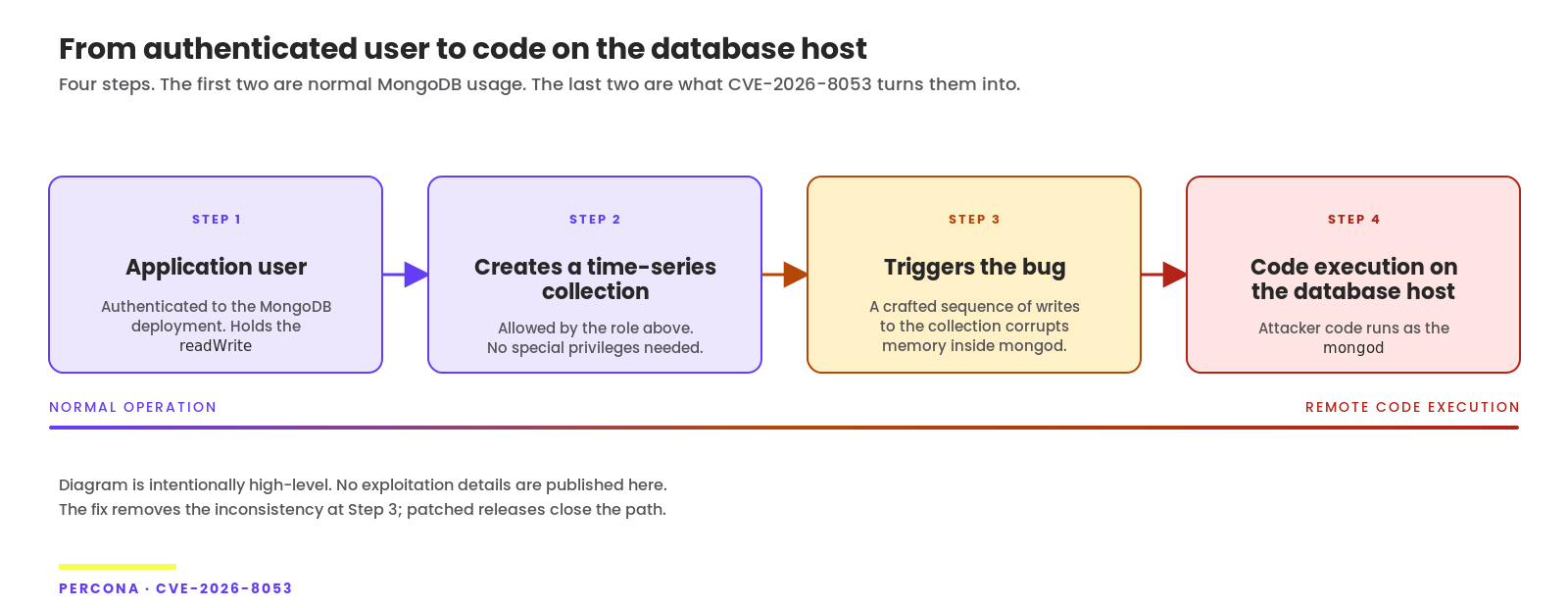
TL;DR: A bug in MongoDB’s time-series collection code allows a user with the standard readWrite
role to corrupt memory within the mongod process. Best case: your database crashes, and you spend the night writing a postmortem. Worst case: an attacker is running their code as mongod, with the same access to your data that the database process itself has — every collection on that node, every index, every secret stored in it. The patch for Percona Server for MongoDB 7.0 is already available; 8.0 will be available tomorrow, and 6.0 will be available early next week.

Every time a bug like this lands, the same conversation plays out in incident channels across the industry. Are we affected? We don’t even use time-series collections! Heads nod. Everyone moves on.

That’s the mistake.

CVE-2026-8053 is an out-of-bounds memory write in MongoDB’s time-series collection — specifically in the internal mapping between measurement field names and column indexes. Under the right input, the mapping drifts out of sync with the underlying buffer and mongod writes off the end of an allocation. From there, under the right conditions, you can execute arbitrary code as the database process.

Upstream tracking lives at SERVER-126021. CVSS v3.1 puts it at 8.8. CVSS v4.0 puts it at 8.7. The labels say “High.” How that “High” translates into your week depends on a couple of assumptions worth questioning.

Read literally, the prerequisite is “an authenticated user with database write privileges.” Read operationally, that bar is lower than most teams treat it as.

The mitigation you think you have doesn’t exist

Modern stacks have dozens of service accounts, with secrets scattered across config files, pipelines, and laptops you’ve long forgotten about. Others end up in log files on bad days. And every user with write access to your cluster sits one step away from the vulnerable code path. In a world like that, “the attacker would need credentials first” isn’t a speed bump — it’s a shrug.

So the real question was never authenticated vs. unauthenticated. It’s what authentication unlocks. Here, it unlocks Remote Code Execution (RCE), which is exactly what the CVSS score is trying to tell you — even if the industry’s reaction hasn’t quite caught up. Attackers don’t need your time-series collection to already exist – they just need someone’s credentials in the wrong hands, and there are more ways for that to happen than most teams want to admit.

I’m not raising this to be smug. I’m raising it because too many incident channels keep stalling on the wrong question. It isn’t: “Does our app use time-series?” It’s: “What can a user holding our readWrite role actually do this week?”

Until you patch, the answer is more than you think.

What Percona is shipping, and when?

6.0 is on the End-Of-Life (EOL) track. The easy call would be to point at the lifecycle page, note that the upgrade conversation is overdue, and stop there. We’re shipping the fix anyway. Customers running 6.0 in production have real reasons they haven’t migrated yet — frozen application stacks, certification cycles, dependencies that don’t move on quarterly cadences — and none of those reasons are worth exploiting while a migration plan gets approved.

Percona is not building binary packages for the 5.x line. We’re being upfront about that — the calculus on extended support has a limit, and 5.x is past it for us. But the fix itself is already in our public release branch: release-5.0.33-26. If you have a hard requirement on 5.x and the time pressure to meet it, the source is available for building. Percona customers on 5.x can open a ticket, and we’ll work on the case individually.

What to do this week?

Patch! Specifically:

  • If you’re on 7.0, upgrade to 7.0.34-19 from May 20 onward.
  • If you’re on 8.0, upgrade to 8.0.23-10 from May 21 onward.
  • If you’re on 6.0, upgrade to 6.0.28-22 from May 25 onward.
  • If you’re on 5.0 and you can’t move, build from release-5.0.33-26. Customers — open a ticket and we’ll help.

As usual, you can download patches from your package manager or Percona Software Downloads page.

If you’re running PSMDB on Kubernetes via the Percona Operator for MongoDB, edit the image tag in your PerconaServerMongoDB custom resource and let the operator roll the cluster. Don’t wait for the June operator release to do it for you. See details in our documentation on how to Upgrade Percona Server for MongoDB.

While you’re in there, audit your custom roles. Anything granting createCollection on a production database is, today, an RCE primitive in waiting. Decide whether the service accounts that hold it actually need it. Decide whether your application users need full readWrite or whether a narrower role would do the same job. Treat the answer as part of your security posture, not as a quarterly cleanup task you’ll get to.

Questions, sharp disagreements, or a 5.x build that won’t compile? Find us on the Percona Forum or, if you’re a customer, in your support portal. If you want to become one and ensure your databases run, check out Percona Services.

The post CVE-2026-8053: “We don’t use time-series” is not a mitigation appeared first on Percona.
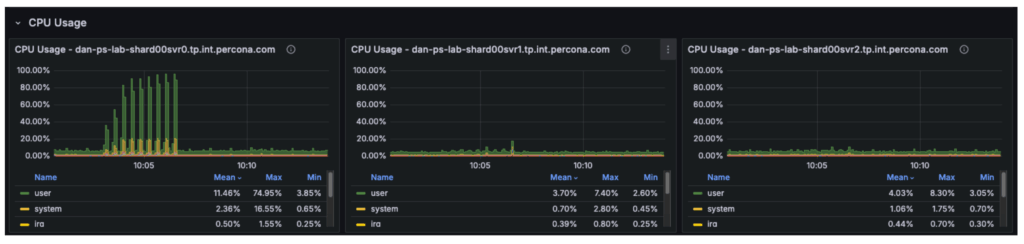


Latest Images